
Opened on Jan 7, 2010 at 11:09:24 AM
Closed on May 10, 2010 at 3:45:02 PM
Last modified on Jan 13, 2012 at 9:06:02 AM
#1397 closed Bug (Fixed)
HotKeySet not working when default keyboard layout set as non-english
| Reported by: | Owned by: | Jpm | |
|---|---|---|---|
| Milestone: | 3.3.7.0 | Component: | AutoIt |
| Version: | 3.3.3.1 | Severity: | None |
| Keywords: | HotKeySet, english, keyboard, layout | Cc: |
Description
For users that have they default keyboard layout set to other language than english in the system, HotKeySet with english letters does not triggers the event function.
Reproducing example (default keyboard layout must be switched to other than english):
;Ctrl + Shift + D
HotKeySet("^+d", "TestFunc")

While 1
	Sleep(100)
WEnd

Func TestFunc()
	MsgBox(0, "TestFunc", "Executed, so default keyboard layout is English, please switch.")
EndFunc
And it is not a system bug as i see it, because here is a script that register a hotkey using «RegisterHotKey» API and «WM_HOTKEY» message:
$VK_D = 0x44

$MOD_ALT = 0x0001
$MOD_CONTROL = 0x0002
$MOD_SHIFT = 0x0004
$MOD_WIN = 0x0008

$hWnd = GUICreate('')
GUIRegisterMsg(0x0312, "MY_WM_HOTKEY") ; WM_HOTKEY

; Set CTRL-SHIT-D
DllCall('user32.dll', 'int', 'RegisterHotKey', 'hwnd', $hWnd, 'int', '0', 'uint', BitOR($MOD_CONTROL, $MOD_SHIFT), 'uint', $VK_D)

While 1
	Sleep(100)
WEnd

Func MY_WM_HOTKEY($hWnd, $Msg, $wParam, $lParam)
	MsgBox(0, 'MY_WM_HOTKEY', 'You pressed CTRL-SHIFT-D.')
	Exit
EndFunc
Tested on:
- Windows XP RU SP3 32
- Windows 7 Home RU 32
Attachments (1)
Change History (13)
follow-up: 4 comment:1 by , on Feb 15, 2010 at 7:41:18 PM
comment:2 by , on Feb 15, 2010 at 8:13:14 PM
I have Italian keyboard layout set and it works.
It works even if I use "^+D" (D is uppercase). Try this because with shift, characters are uppercased.
But what do you mean as other language than english? Latin or Asiatic/Cyrillic languages? Maybe it's a problem with RU(ssian) systems or keyboards.
Tested on Windows Server 2008 Enterprise SP2 Italian 32-bit with AutoIt 3.3.4.0
comment:3 by , on Feb 15, 2010 at 8:15:53 PM
Sorry, I've made a mistake. It's Windows Server 2008 Enterprise SP2 English 32-bit with Italian MUI Language Pack, Italian keyboard layout as default and AutoIt v3.3.4.0.
comment:4 by , on Feb 20, 2010 at 1:08:56 PM
Replying to Jon:
Not sure this is a bug. If I change the keyboard to Russian and then run:
; Looks like D is в on the Russian keyboard
HotKeySet("^+в", "TestFunc")
Then it works fine.
It works fine (not everywhere thought, see next), but then we should check every time the keyboard layout:
Switch @KBLayout
Case 0409
HotKeySet("^+d", "TestFunc")
Case 0419
HotKeySet("^+в", "TestFunc")
EndSwitch
but even this is not working on my other system, where the base language is Hebrew, and no mater what default keyboard layout is set (russian or hebrew).
Replying to VittGam <vittgam@…>:
But what do you mean as other language than english? Latin or Asiatic/Cyrillic languages? Maybe it's a problem with RU(ssian) systems or keyboards.
I mean non-latin, that is out of 1-127 characters range set. And no, it's not russian-specific issue :)
by , on May 9, 2010 at 4:00:18 PM
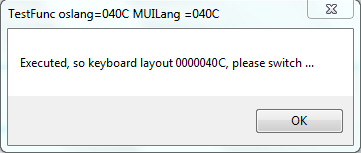
| Attachment: | Hotkeyset.PNG added |
|---|
follow-up: 6 comment:5 by , on May 9, 2010 at 4:03:27 PM
I cannot have acces to a russian or Hebrew window, but I want to be sure of the output on such system with the following script
;Ctrl + Shift + D
$hotkeyset=HotKeySet("^+d", "TestFunc")
If $hotkeyset Then
While 1
Sleep(100)
WEnd
Else
MsgBox(0, "Error oslang=" & @OSLang & " MUILang =" & @MUILang, "HotKeySet (Ctrl+Shift+D) already registered keyboard layout " & @KBLayout)
EndIf
Func TestFunc()
MsgBox(0, "TestFunc oslang=" & @OSLang & " MUILang =" & @MUILang, "Executed, so keyboard layout " & @KBLayout & ", please switch ...")
Exit
EndFunc
But it works on my French Win7 see attach HotKeySet.png image
comment:6 by , on May 9, 2010 at 11:36:07 PM
Replying to Jpm:
I cannot have acces to a russian or Hebrew window, but I want to be sure of the output on such system with the following script
No output, it's not responding when «Ctrl + Shift + D» pressed, the function is not executed.
And if i change to English layout, it will show this:

comment:7 by , on May 10, 2010 at 1:15:34 PM
Thanks,
So I don't know how to solve the fact that VK code must correspond to the lower case.
in the russian keyboard it must be в.
hotkeyset function don't really care about +d or +D, at least as it is coded.
for russian keyboard. Same kind of problem occur with Send()
Certain keyboard as the Czech one send different characters when using the Shift Key or being in CAPS LOCK enabled and sending a char. Due to the send AutoIt implementation the CAPS LOCKed char will be sent as Shifted one so it will not work.
The only think I can do is to add some warning in HotKeySet doc
comment:8 by , on May 10, 2010 at 2:55:11 PM
I just found how to detect that +d or +D cannot be register with russian keyboard.
So I will set an @error code with return =0
comment:9 by , on May 10, 2010 at 3:45:02 PM
| Milestone: | → 3.3.7.0 |
|---|---|
| Owner: | set to |
| Resolution: | → Fixed |
| Status: | new → closed |
Fixed by revision [5809] in version: 3.3.7.0
comment:11 by , on Jan 4, 2012 at 10:01:36 PM
Here is the fix i use:
;THIS IS THE FIX!
_WinAPI_LoadKeyboardLayoutEx(0x4109) ;We set English locale as default for our application
;Ctrl + Shift + D
HotKeySet("^+d", "TestFunc")
While 1
Sleep(100)
WEnd
Func TestFunc()
MsgBox(0, "TestFunc", "Executed, so default keyboard layout is English, please switch.")
EndFunc
Func _WinAPI_LoadKeyboardLayoutEx($sLayoutID, $hWnd = 0)
Local Const $WM_INPUTLANGCHANGEREQUEST = 0x50
Local $aRet = DllCall("user32.dll", "long", "LoadKeyboardLayoutW", "wstr", Hex($sLayoutID, 8), "int", 0)
If Not @error And $aRet[0] Then
If $hWnd = 0 Then
$hWnd = WinGetHandle(AutoItWinGetTitle())
EndIf
DllCall("user32.dll", "ptr", "SendMessage", "hwnd", $hWnd, "int", $WM_INPUTLANGCHANGEREQUEST, "int", 1, "int", $aRet[0])
Return 1
EndIf
Return SetError(1)
EndFunc
comment:12 by , on Jan 13, 2012 at 9:06:02 AM
I think Autoit does not have the responsability to change the locale.
If the user want, he can do it as you did.
what the fix did was to report the failure in the @error if I remember.


Not sure this is a bug. If I change the keyboard to Russian and then run:
; Looks like D is в on the Russian keyboard
HotKeySet("^+в", "TestFunc")
Then it works fine. But when the API tries resolve the key "d" on a Russian keyboard it fails, but I sort of expected that. I guess I could assume that if a key is in the ASCII range then to take the VK code literally, but I'm wondering if that would actually break more...