


wakillon
-
Posts
3,351 -
Joined
-
Last visited
-
Days Won
29




.thumb.gif.f0fcf5626c0e51d894959a28cd718fe7.gif)




wakillon's Achievements

-
 Update v1.0.7.5 Adapt SciTE display with script encoding Stay at the first visible line after an edit action on a au3 file
 -
 SupaNewb reacted to a file:
SciTE Hopper
SupaNewb reacted to a file:
SciTE Hopper
-
wakillon reacted to a post in a topic:
Object Oriented Like GUIs -- GUIObjects
-
wakillon changed their profile photo
-
Updated Suppressed OnAutoItExitRegister who do not always his job and sometimes lock the restart of the script Added a tray item menu for available the hide of the gui 5 sec after a launch Added a new button's contextual item menu for open parent directory
-
wakillon reacted to a post in a topic:
Clipboard Translator With Read Aloud
-
WildByDesign reacted to a post in a topic:
AutoIt Snippets
-
 argumentum reacted to a post in a topic:
AutoIt Snippets
argumentum reacted to a post in a topic:
AutoIt Snippets
-
#AutoIt3Wrapper_UseX64=n #include <GuiListView.au3> Global $aIconData, $hWnd, $aPos, $iCount $hWnd = ControlGetHandle(WinGetHandle('[CLASS:Progman]'), '', '[CLASS:SysListView32;Instance:1]') ; desktop listview handle (x64) If $hWnd Then $iCount = _GUICtrlListView_GetItemCount($hWnd) Dim $aIconData[$iCount][3] For $i = 0 To $iCount - 1 $aPos = _GUICtrlListView_GetItemPosition($hWnd, $i) $aIconData[$i][0] = _GUICtrlListView_GetItemText($hWnd, $i) $aIconData[$i][1] = $aPos[0] $aIconData[$i][2] = $aPos[1] Next _ArrayDisplay($aIconData) Else MsgBox(16, 'Error', 'Can not get the Desktop handle') EndIf Exit If you try this simple script you will see that _GUICtrlListView_GetItemText do not work under x86 and _GUICtrlListView_GetItemPosition crash sometimes the script under x64 So, here is a workaround (modifying TagLVITEM structure and checking target process architecture) for get it working under x86 and x64 #AutoIt3Wrapper_UseX64=n ; work on x86 and x64 #include <GuiListView.au3> Global $aIconData, $hWnd, $aPos, $iCount $hWnd = ControlGetHandle(WinGetHandle('[CLASS:Progman]'), '', '[CLASS:SysListView32;Instance:1]') ; desktop listview If $hWnd Then $iCount = _GUICtrlListView_GetItemCount($hWnd) Dim $aIconData[$iCount][3] For $i = 0 To $iCount - 1 $aPos = _GUICtrlListView_GetItemPosition_Mod($hWnd, $i) $aIconData[$i][0] = _GUICtrlListView_GetItemText_Mod($hWnd, $i) $aIconData[$i][1] = $aPos[0] $aIconData[$i][2] = $aPos[1] Next _ArrayDisplay($aIconData) Else MsgBox(16, 'Error', 'Can not get the Desktop listview handle') EndIf Exit Func _GUICtrlListView_GetItemPosition_Mod($hWnd, $iIndex) Local $tPoint = DllStructCreate($tagPOINT) Local $iRet = __GUICtrl_SendMsg_Mod($hWnd, $LVM_GETITEMPOSITION, $iIndex, $tPoint, 0, True, -1) Local $aPoint[2] = [0, 0] If Not $iRet Then Return $aPoint $aPoint[0] = DllStructGetData($tPoint, 'X') $aPoint[1] = DllStructGetData($tPoint, 'Y') Return $aPoint EndFunc ;==>_GUICtrlListView_GetItemPosition_Mod Func _GUICtrlListView_GetItemText_Mod($hWnd, $iIndex, $iSubItem = 0) Local $tBuffer, $iMsg If _GUICtrlListView_GetUnicodeFormat($hWnd) Then $tBuffer = DllStructCreate('wchar[4096]') $iMsg = $LVM_GETITEMTEXTW Else $tBuffer = DllStructCreate('char[4096]') $iMsg = $LVM_GETITEMTEXTA EndIf ; Detect if the target process (Explorer) is 64-bit while the script is 32-bit Local $bTargetIs64Bit = _ControlHandleIsFrom64BitProcess($hWnd) ; StringInStr(@OSArch, '64') <> 0 ; Definition of the $tagLVITEM structure adapted to the target Local $sTagLVITEM = $tagLVITEM If $bTargetIs64Bit And Not @AutoItX64 Then ;~ $tagLVITEM = 'struct;uint Mask;int Item;int SubItem;uint State;uint StateMask;ptr Text;int TextMax;int Image;lparam Param;' & _ ;~ 'int Indent;int GroupID;uint Columns;ptr pColumns;ptr piColFmt;int iGroup;endstruct' ; Structure $tagLVITEM forced to 64 bits for 32-bit script $sTagLVITEM = 'struct;uint Mask;int Item;int SubItem;uint State;uint StateMask;uint64 Text;int TextMax;int Image;uint64 Param;' & _ 'int Indent;int GroupID;uint Columns;uint64 pColumns;uint64 piColFmt;int iGroup;endstruct' EndIf Local $tItem = DllStructCreate($sTagLVITEM) DllStructSetData($tItem, 'Mask', $LVIF_TEXT) DllStructSetData($tItem, 'SubItem', $iSubItem) DllStructSetData($tItem, 'TextMax', 4096) __GUICtrl_SendMsg_Mod($hWnd, $iMsg, $iIndex, $tItem, $tBuffer, False, 6, True, 6, $bTargetIs64Bit) Return DllStructGetData($tBuffer, 1) EndFunc ;==>_GUICtrlListView_GetItemText_Mod Func __GUICtrl_SendMsg_Mod($hWnd, $iMsg, $iIndex, ByRef $tItem, $tBuffer = 0, $bRetItem = False, $iElement = -1, $bRetBuffer = False, $iElementMax = $iElement, $bTargetIs64Bit = False) If $iElement > 0 And Not ($bTargetIs64Bit And Not @AutoItX64) Then DllStructSetData($tItem, $iElement, DllStructGetPtr($tBuffer)) If $iElement = $iElementMax Then DllStructSetData($tItem, $iElement + 1, DllStructGetSize($tBuffer)) EndIf Local $iRet = 0 If IsHWnd($hWnd) Then Local $aCall = DllCall('user32.dll', 'uint', 'GetWindowThreadProcessId', 'hwnd', $hWnd, 'dword*', 0) If @error Then Return 0 Local $iTargetPID = $aCall[2] If ($hWnd = $__g_hGUICtrl_LastWnd) Or ($iTargetPID = @AutoItPID) Then $__g_hGUICtrl_LastWnd = $hWnd Local $aSign = DllCall('user32.dll', 'lresult', 'SendMessageW', 'hwnd', $hWnd, 'uint', $iMsg, 'wparam', $iIndex, 'struct*', $tItem) If Not @error Then $iRet = $aSign[0] Else Local $iItemSize = DllStructGetSize($tItem) Local $iItemAlloc = Ceiling($iItemSize / 16) * 16 Local $tMemMap, $pText Local $iBufferSz = 0 If ($iElement > 0) Or ($iElementMax = 0) Then $iBufferSz = DllStructGetSize($tBuffer) Local $pMemory = _MemInit($hWnd, $iItemAlloc + $iBufferSz, $tMemMap) If @error Then Return 0 If $iBufferSz Then $pText = $pMemory + $iItemAlloc If $bTargetIs64Bit And Not @AutoItX64 Then ; Manual injection of the 64-bit pointer into the structure DllStructSetData($tItem, $iElement, $pText) DllStructSetData($tItem, $iElement + 1, $iBufferSz) Else If $iElementMax Then DllStructSetData($tItem, $iElement, $pText) Else $iIndex = $pText EndIf EndIf _MemWrite($tMemMap, $tBuffer, $pText, $iBufferSz) EndIf _MemWrite($tMemMap, $tItem, $pMemory, $iItemSize) Local $aSign = DllCall('user32.dll', 'lresult', 'SendMessageW', 'hwnd', $hWnd, 'uint', $iMsg, 'wparam', $iIndex, 'ptr', $pMemory) If Not @error Then $iRet = $aSign[0] If $iBufferSz And $bRetBuffer Then _MemRead($tMemMap, $pText, $tBuffer, $iBufferSz) If $bRetItem Then _MemRead($tMemMap, $pMemory, $tItem, $iItemSize) ;DllStructGetSize($tItem)) _MemFree($tMemMap) EndIf Else $iRet = GUICtrlSendMsg($hWnd, $iMsg, $iIndex, DllStructGetPtr($tItem)) EndIf Return $iRet EndFunc ;==>__GUICtrl_SendMsg_Mod Func _ControlHandleIsFrom64BitProcess($hWnd) ; check the target process architecture Local $aRet = DllCall('user32.dll', 'dword', 'GetWindowThreadProcessId', 'hwnd', $hWnd, 'dword*', 0) If @error Then Return False Local $hProcess = DllCall('kernel32.dll', 'handle', 'OpenProcess', 'dword', $PROCESS_QUERY_LIMITED_INFORMATION, 'bool', False, 'dword', $aRet[2]) If @error Or Not $hProcess[0] Then Return False $aRet = DllCall('kernel32.dll', 'bool', 'IsWow64Process', 'handle', $hProcess[0], 'bool*', False) If @error Then Return False DllCall('kernel32.dll', 'bool', 'CloseHandle', 'handle', $hProcess[0]) If @error Then Return False ; If IsWow64Process returns False on a 64-bit OS, the target process is natively 64-bit. Return ((StringInStr(@OSArch, '64') <> 0) And Not $aRet[2]) EndFunc ;==>_ControlHandleIsFrom64BitProcess
-
Dan_555 reacted to a post in a topic:
TrayToolBar v1.0.1.8
-
Gianni reacted to a post in a topic:
TrayToolBar v1.0.1.8
-
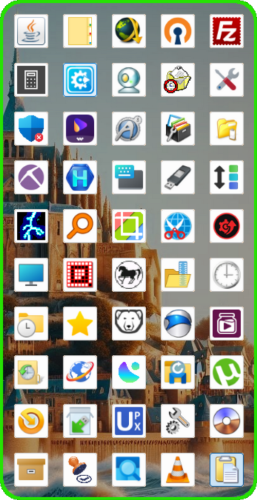
No, it's not a new iPhone 😅, it's a new fully customizable transparent toolbar with blur effect : TrayToolBar v1.0.1.7 Tired of searching for shortcuts to your favorites folders/programs ? You just have to Drag&Drop file/dir shortcut, directory, executable, document, music, video or url shortcut on any button for register it. For Run/Open file/dir, Double Click on Buttons. You want to organize the buttons by theme ? buttons can be moved to an other location by Drag&Drop. By using the right-click context menu on the buttons, you can delete buttons, change their icons with your own icons, and also edit the text/name of Tiptext who display the name of each button. You need more/less Buttons ? no problem, You can easily Add/Remove button's columns via Tray Menu (Min = 1, Max=10). Apart from the first run, TrayToolBar will always start minimized in system tray icon. A simple Left Click on his Tray Icon for Show/Hide the gui. The Gui adapts itself to DPI settings/changes and can be moved by dragging the top of colored edge. Some Buttons are pre-installed but can be (re)moved. Settings are saved in TrayToolBar.ini file in scriptdir. See Tray Menu for other Settings. Thanks to UEZ for his help ! Script is available in the download section
- 1 reply
-
- 2
-
-
Version 1.0.1.8
75 downloads
No, it's not a new iPhone, it's a new fully customizable transparent toolbar with blur effect : TrayToolBar Tired of searching for shortcuts to your favorites folders/programs ? You just have to Drag&Drop file/dir shortcut, directory, executable, document, music, video or url shortcut on any button for register it. For Run/Open file/dir, Double Click on Buttons. You want to organize the buttons by theme ? buttons can be moved to an other location by Drag&Drop. By using the right-click context menu on the buttons, you can delete buttons, change their icons with your own icons, and also edit the text/name of Tiptext who display the name of each button. You need more/less Buttons ? no problem, You can easily Add/Remove button's columns via Tray Menu (Min = 1, Max=10). Apart from the first run, TrayToolBar will always start minimized in system tray icon. A simple Left Click on his Tray Icon for Show/Hide the gui. The Gui adapts itself to DPI settings/changes and can be moved by dragging the top of colored edge. Some Buttons are pre-installed but can be (re)moved. Settings are saved in TrayToolBar.ini file in scriptdir. See Tray Menu for other Settings. Thanks to UEZ for his help ! -
wakillon reacted to a post in a topic:
Round buttons
-
wakillon reacted to a post in a topic:
Native Autoit Ribbon
-
4 new GDI+ sreensavers added (link in first post) ShootingStarsField, AmoebasWandering, SwirlingTunnel and RetroFlipClock
-
Version 1.0.0.1
61 downloads
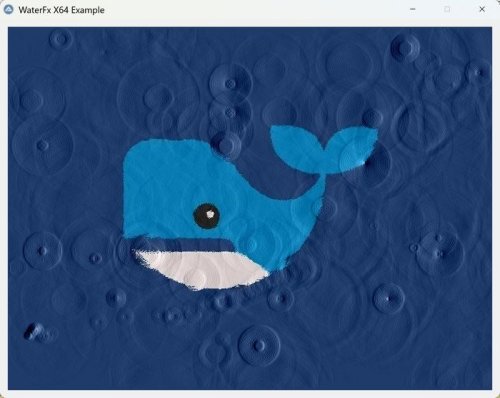
After Water Effects I found an other dll called WaterFX on github x64 version available More settings than Water Effects Support Png, jpeg and bmp Can be loaded in memory Hovering the mouse over the GUI works fine The script is based on the documentation, but it's not very clear for some functions like _WatterFX_set_alpha_format, _WatterFX_create2, and _WatterFX_autosize, which seem to have some limitations. -
Parsix reacted to a post in a topic:
Png2Icon Update of 4 july 2026
-
Update v1.0.7.2 2 bugs corrected and now SciTEHopper detects if a window is above SciTE to allow sliding without needing to activate the SciTE window
-
ioa747 reacted to a post in a topic:
Png2Icon Update of 4 july 2026
-
WildByDesign reacted to a post in a topic:
Png2Icon Update of 4 july 2026
-
pixelsearch reacted to a post in a topic:
Png2Icon Update of 4 july 2026
-
Updated to v1.0.1.3 for support svg files but also webp files (Thanks UEZ)
-
KaFu reacted to a post in a topic:
Png2Icon Update of 4 july 2026
-
Thanks WildByDesign Script updated to v1.0.1.2 version (see first post) Icon sizes availables are now : 256, 128, 96, 64, 48, 40, 32, 24, 20, 16 For SVG files, It's going to take some time 😅
-
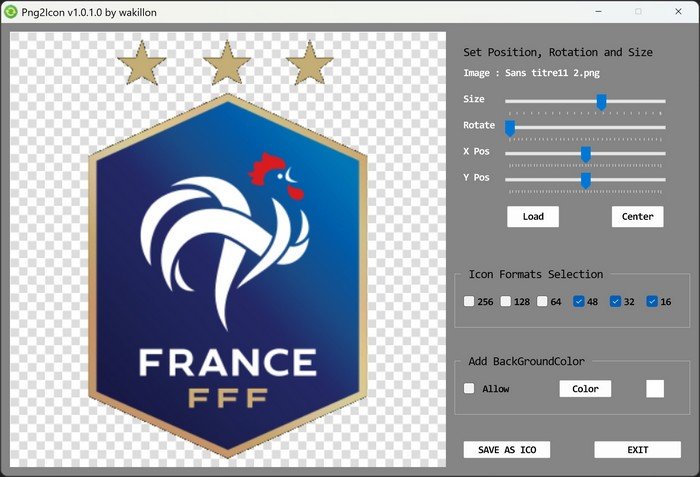
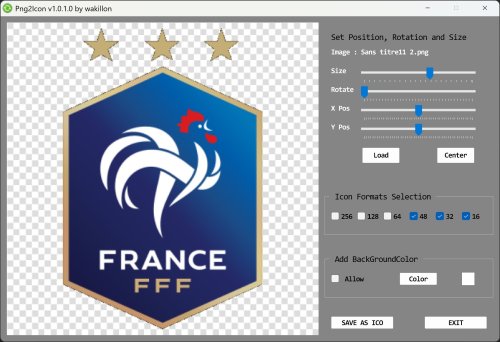
Why not create your own Icons from a picture ? There are a few programs with the same goal, but when it comes to settings, it's very limited and if your image is crooked or not centered, well you can't do much Png2Icon convert using GDI+, png, bmp, jpg, gif, tiff, svg and webp to Icon 32 bit Load image file or DragNDrop on preview part and adjust position, size, rotation as you want The transparency of PNGs is preserved but background Color can be also set Select desired sizes (16 to 256) Press SaveAsIcon button and voila! Png2Icon v1.0.1.3.au3 is available in the download section Soon a third star! 😋
- 3 replies
-
- 12
-
-
-
Version 1.0.1.3
126 downloads
Why not create your own Icons from a picture ? There are a few programs with the same goal, but when it comes to settings, it's very limited and if your image is crooked or not centered, well you can't do much Png2Icon convert png, bmp, jpg, tiff and gif to Icon 32 bit Load image file or Drag&Drop on the preview part and adjust position, size, rotation as you want The transparency of PNGs is preserved but background Color can be also set Select desired sizes (256, 128, 96, 64, 48, 40, 32, 24, 20, 16) Press SaveAsIcon button and voila! -
It's thanks to you 😉
-
wakillon reacted to a post in a topic:
GDI+ ScreenSavers
-
8 GDI+ ScreenSavers Examples + Music Tested on 4K with Win 11 Availables in the download Section
-

97 downloads
8 GDI+ ScreenSavers + Music Tested on 4K under Win 11