
Search the Community
Showing results for tags 'digital'.
Found 3 results
-
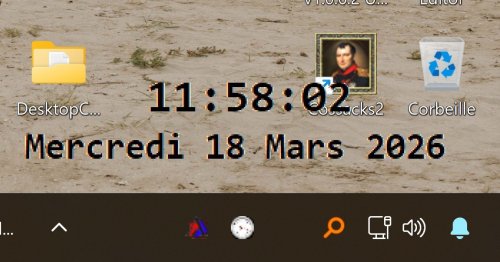
Before I used the free DesktopDigitalClock from softwareok.com which is very good But sometimes the clock bothered me because I couldn't see what was behind it on the screen and there was no way to move it quickly The second problem was that the clock's display color made the time become unreadable depending on the color of the window behind it So, why not create my own that would be draggable and would adapt its display color (dark/light) to the window located behind it See tray menu for options Script available in download section : DesktopClock v1.0.0.6
-
Version 1.0.0.6
118 downloads
Draggable digital desktop Clock with transparent background and the display color (dark/light) adapts to the color of the window behind it for easier reading of the time See tray menu for options -
Basically, I would like to replace the Windows System Tray Clock with my own having more useful functionality. An example of this in C++ is here: http://blogs.msdn.com/b/abhinaba/archive/2005/09/12/464150.aspx But it doesn't seem AutoIT has similar commands in it's systemtray functions. I have no idea how to start coding this, but any useful direction would be greatly appreciated. (I hope I have the right thread this time). Thank you.


