Search the Community
Showing results for tags 'Map'.
Found 10 results
-
 A simple _MAPdisplay() function: displays the contents of a MAP variable in a TreeView handles nested MAPs if a MAP key contains an array (1D or 2D), it displays the contents in a draft form If an array element contains a sub-MAP, a sub-array or other "non printable" variables, it is indicated the VarType but not recursively expanded. I’ve uploaded a new version with some minor improvements, primarily regarding the preview display of the array draft. The layout is as follows: on the left side of the list, enclosed in square brackets, is the key name; on the right side is the key's content. The two elements are separated by a colon. If the key's content is a MAP, an Array, or a variable type that cannot be printed directly, it is indicated by a placeholder enclosed in curly braces. For MAPs or Arrays, you need to expand the corresponding TreeView item to view the content. I hope it is bug-free and proves useful. Any reports of errors or suggestions for improvements are welcome. Cheers and enjoy! P.S. The MAP used in the example is quite complex and likely unusual, but I intentionally designed it that way to stress-test the function. This is the UDF. Below there is a second script with example #include <TreeViewConstants.au3> #include <GUIConstantsEx.au3> #include <WindowsConstants.au3> #include <Array.au3> ; #FUNCTION# ==================================================================================================================== ; Name ..........: _MapDisplay ; Description ...: Displays the content of a MAP variable ; Syntax ........: _MapDisplay($mMAP) ; Parameters ....: $mMAP - a variable of type MAP ; Return values .: None ; Author ........: Gianni Addiego ; Modified ......: ; Remarks .......: v 1.0 ; Related .......: ; Link ..........: ; Example .......: ; =============================================================================================================================== Func _MapDisplay(ByRef $mMain, $bPseudoParent = False) If Not IsMap($mMain) Then Return SetError(1, 0, '') ; Create and show the GUI Local $hGUI = GUICreate("Map Display", 850, 550) Local $idTreeView = GUICtrlCreateTreeView(10, 10, 830, 530, $TVS_HASBUTTONS + $TVS_HASLINES + $TVS_LINESATROOT, $WS_EX_CLIENTEDGE) GUICtrlSetFont($idTreeView, 8.5, 0, 0, "Courier New") GUISetState(@SW_SHOW) If $bPseudoParent Then ; (virtual root) Local $__mPseudoRoot[] $__mPseudoRoot['Root'] = $mMain _MapToTreeView($__mPseudoRoot, $idTreeView) Else _MapToTreeView($mMain, $idTreeView) EndIf ; Waiting loop Do Until GUIGetMsg() = $GUI_EVENT_CLOSE GUIDelete($hGUI) $idTreeView = 0 Return EndFunc ;==>_MapDisplay ; Ebhanced recursive function Func _MapToTreeView(ByRef $map, $idParent) Local $aKeys = MapKeys($map) Local $key, $value, $idNewParentNode Local $iDimensions, $idNodeArray1D, $idNodeArray2D Local $iRows, $iColumns, $sRowText, $vCheckType, $sArrayHeader, $aArrayFormatted Local $iColWidth = 10 If UBound($aKeys) = 0 Then ; Is an empty MAP $idNewParentNode = GUICtrlCreateTreeViewItem("{empty}", $idParent) Return EndIf For $i = 0 To UBound($aKeys) - 1 $key = $aKeys[$i] $value = $map[$key] ; --- Nested MAP If IsMap($value) Then $idNewParentNode = GUICtrlCreateTreeViewItem("[" & $key & "]: (MAP)", $idParent) _MapToTreeView($value, $idNewParentNode) ; --- Array (1D or 2D) ElseIf IsArray($value) Then ; Check the number of array dimensions $iDimensions = UBound($value, $UBOUND_DIMENSIONS) $idNodeArray = GUICtrlCreateTreeViewItem("[" & $key & "]: (" & $iDimensions & "D ARRAY)", $idParent) If $iDimensions < 3 Then $aArrayFormatted = _FormatArrayToColumns($value, $iColWidth) $sArrayHeader = StringFormat("%-" & StringLen(UBound($aArrayFormatted) - 1) + 4 & "s", "Row") For $c = 0 To UBound($value, $UBOUND_COLUMNS) - 1 $sArrayHeader &= StringFormat("%-" & $iColWidth + 3 & "s", "Col" & $c) Next If UBound($aArrayFormatted, 1) Then GUICtrlCreateTreeViewItem($sArrayHeader, $idNodeArray) For $ii = 0 To UBound($aArrayFormatted) - 1 GUICtrlCreateTreeViewItem("#" & StringFormat("%" & StringLen(UBound($aArrayFormatted) - 1) & "s", $ii) & " : " & $aArrayFormatted[$ii], $idNodeArray) Next Else GUICtrlCreateTreeViewItem("{empty}", $idNodeArray) EndIf Else ; --- MultiD Array ; Arrays with 3 or more dimensions (uncommon, showing a warning only) $sMsg = "Preview unsupported for " & $iDimensions & "D array. Subscripts: -> " For $s = 1 To $iDimensions $sMsg &= "[" & UBound($value, $s) & "]" Next GUICtrlCreateTreeViewItem($sMsg, $idNodeArray) ; MultiD Arrays Unsupported EndIf Else ; --- Standalone value $vCheckType = IsArray($value) ? '{Array}' _ : IsMap($value) ? '{MAP}' _ : IsObj($value) ? '{Object}' _ : IsDllStruct($value) ? '{DLLStruct}' _ : IsFunc($value) ? '{Function}' _ : ((Not IsBool($value)) And ($value = "")) ? '{empty}' _ : $value GUICtrlCreateTreeViewItem("[" & $key & "]: " & $vCheckType, $idParent) EndIf Next EndFunc ;==>_MapToTreeView ; Minimalist clone of _ArrayDisplay Func _FormatArrayToColumns(Const ByRef $aInput, $iColWidth, $bAlignLeft = True) Local $iDims, $iRows, $iCols, $sCellText, $sRowText, $sFormat ; check if is array If Not IsArray($aInput) Then Return SetError(1, 0, 0) $iDims = UBound($aInput, 0) ; array dimensions $iRows = UBound($aInput, 1) Local $aOutput[$iRows] $sFormat = "%-" & ($iDims = 1 ? '' : $iColWidth & ".") & $iColWidth & "s" ; Left align (default) If Not $bAlignLeft Then $sFormat = "%" & ($iDims = 1 ? '' : $iColWidth & ".") & $iColWidth & "s" ; Right align EndIf If Not $iRows Then Return $aOutput EndIf ; Array rows loop For $i = 0 To $iRows - 1 $sRowText = "" If $iDims = 1 Then ; Array 1D $sRowText = StringFormat($sFormat, String(IsArray($aInput[$i]) ? '{Array}' _ : IsMap($aInput[$i]) ? '{MAP}' _ : IsObj($aInput[$i]) ? '{Object}' _ : IsDllStruct($aInput[$i]) ? '{DLLStruct}' _ : IsFunc($aInput[$i]) ? '{Function}' _ : $aInput[$i])) ElseIf $iDims = 2 Then ; Array 2D $iCols = UBound($aInput, 2) For $j = 0 To $iCols - 1 $sCellText = StringFormat($sFormat, String(IsArray($aInput[$i][$j]) ? '{Array}' _ : IsMap($aInput[$i][$j]) ? '{MAP}' _ : IsObj($aInput[$i][$j]) ? '{Object}' _ : IsDllStruct($aInput[$i][$j]) ? '{DLLStruct}' _ : IsFunc($aInput[$i][$j]) ? '{Function}' _ : $aInput[$i][$j])) $sRowText &= StringLen($aInput[$i][$j]) > $iColWidth ? $sCellText & '>| ' : $sCellText & " | " Next EndIf $aOutput[$i] = $sRowText Next Return $aOutput EndFunc ;==>_FormatArrayToColumns This second script contains the UDF and an example that generates a rather complex map and displays it. #include <TreeViewConstants.au3> #include <GUIConstantsEx.au3> #include <WindowsConstants.au3> #include <Array.au3> ; #FUNCTION# ==================================================================================================================== ; Name ..........: _MapDisplay ; Description ...: Displays the content of a MAP variable ; Syntax ........: _MapDisplay($mMAP) ; Parameters ....: $mMAP - a variable of type MAP ; Return values .: None ; Author ........: Gianni Addiego ; Modified ......: ; Remarks .......: v 1.0 ; Related .......: ; Link ..........: ; Example .......: ; =============================================================================================================================== Func _MapDisplay(ByRef $mMain, $bPseudoParent = False) If Not IsMap($mMain) Then Return SetError(1, 0, '') ; Create and show the GUI Local $hGUI = GUICreate("Map Display", 850, 550) Local $idTreeView = GUICtrlCreateTreeView(10, 10, 830, 530, $TVS_HASBUTTONS + $TVS_HASLINES + $TVS_LINESATROOT, $WS_EX_CLIENTEDGE) GUICtrlSetFont($idTreeView, 8.5, 0, 0, "Courier New") GUISetState(@SW_SHOW) If $bPseudoParent Then ; (virtual root) Local $__mPseudoRoot[] $__mPseudoRoot['Root'] = $mMain _MapToTreeView($__mPseudoRoot, $idTreeView) Else _MapToTreeView($mMain, $idTreeView) EndIf ; Waiting loop Do Until GUIGetMsg() = $GUI_EVENT_CLOSE GUIDelete($hGUI) $idTreeView = 0 Return EndFunc ;==>_MapDisplay ; Ebhanced recursive function Func _MapToTreeView(ByRef $map, $idParent) Local $aKeys = MapKeys($map) Local $key, $value, $idNewParentNode Local $iDimensions, $idNodeArray1D, $idNodeArray2D Local $iRows, $iColumns, $sRowText, $vCheckType, $sArrayHeader, $aArrayFormatted Local $iColWidth = 10 If UBound($aKeys) = 0 Then ; Is an empty MAP $idNewParentNode = GUICtrlCreateTreeViewItem("{empty}", $idParent) Return EndIf For $i = 0 To UBound($aKeys) - 1 $key = $aKeys[$i] $value = $map[$key] ; --- Nested MAP If IsMap($value) Then $idNewParentNode = GUICtrlCreateTreeViewItem("[" & $key & "]: (MAP)", $idParent) _MapToTreeView($value, $idNewParentNode) ; --- Array (1D or 2D) ElseIf IsArray($value) Then ; Check the number of array dimensions $iDimensions = UBound($value, $UBOUND_DIMENSIONS) $idNodeArray = GUICtrlCreateTreeViewItem("[" & $key & "]: (" & $iDimensions & "D ARRAY)", $idParent) If $iDimensions < 3 Then $aArrayFormatted = _FormatArrayToColumns($value, $iColWidth) $sArrayHeader = StringFormat("%-" & StringLen(UBound($aArrayFormatted) - 1) + 4 & "s", "Row") For $c = 0 To UBound($value, $UBOUND_COLUMNS) - 1 $sArrayHeader &= StringFormat("%-" & $iColWidth + 3 & "s", "Col" & $c) Next If UBound($aArrayFormatted, 1) Then GUICtrlCreateTreeViewItem($sArrayHeader, $idNodeArray) For $ii = 0 To UBound($aArrayFormatted) - 1 GUICtrlCreateTreeViewItem("#" & StringFormat("%" & StringLen(UBound($aArrayFormatted) - 1) & "s", $ii) & " : " & $aArrayFormatted[$ii], $idNodeArray) Next Else GUICtrlCreateTreeViewItem("{empty}", $idNodeArray) EndIf Else ; --- MultiD Array ; Arrays with 3 or more dimensions (uncommon, showing a warning only) $sMsg = "Preview unsupported for " & $iDimensions & "D array. Subscripts: -> " For $s = 1 To $iDimensions $sMsg &= "[" & UBound($value, $s) & "]" Next GUICtrlCreateTreeViewItem($sMsg, $idNodeArray) ; MultiD Arrays Unsupported EndIf Else ; --- Standalone value $vCheckType = IsArray($value) ? '{Array}' _ : IsMap($value) ? '{MAP}' _ : IsObj($value) ? '{Object}' _ : IsDllStruct($value) ? '{DLLStruct}' _ : IsFunc($value) ? '{Function}' _ : ((Not IsBool($value)) And ($value = "")) ? '{empty}' _ : $value GUICtrlCreateTreeViewItem("[" & $key & "]: " & $vCheckType, $idParent) EndIf Next EndFunc ;==>_MapToTreeView ; Minimalist clone of _ArrayDisplay Func _FormatArrayToColumns(Const ByRef $aInput, $iColWidth, $bAlignLeft = True) Local $iDims, $iRows, $iCols, $sCellText, $sRowText, $sFormat ; check if is array If Not IsArray($aInput) Then Return SetError(1, 0, 0) $iDims = UBound($aInput, 0) ; array dimensions $iRows = UBound($aInput, 1) Local $aOutput[$iRows] $sFormat = "%-" & ($iDims = 1 ? '' : $iColWidth & ".") & $iColWidth & "s" ; Left align (default) If Not $bAlignLeft Then $sFormat = "%" & ($iDims = 1 ? '' : $iColWidth & ".") & $iColWidth & "s" ; Right align EndIf If Not $iRows Then Return $aOutput EndIf ; Array rows loop For $i = 0 To $iRows - 1 $sRowText = "" If $iDims = 1 Then ; Array 1D $sRowText = StringFormat($sFormat, String(IsArray($aInput[$i]) ? '{Array}' _ : IsMap($aInput[$i]) ? '{MAP}' _ : IsObj($aInput[$i]) ? '{Object}' _ : IsDllStruct($aInput[$i]) ? '{DLLStruct}' _ : IsFunc($aInput[$i]) ? '{Function}' _ : $aInput[$i])) ElseIf $iDims = 2 Then ; Array 2D $iCols = UBound($aInput, 2) For $j = 0 To $iCols - 1 $sCellText = StringFormat($sFormat, String(IsArray($aInput[$i][$j]) ? '{Array}' _ : IsMap($aInput[$i][$j]) ? '{MAP}' _ : IsObj($aInput[$i][$j]) ? '{Object}' _ : IsDllStruct($aInput[$i][$j]) ? '{DLLStruct}' _ : IsFunc($aInput[$i][$j]) ? '{Function}' _ : $aInput[$i][$j])) $sRowText &= StringLen($aInput[$i][$j]) > $iColWidth ? $sCellText & '>| ' : $sCellText & " | " Next EndIf $aOutput[$i] = $sRowText Next Return $aOutput EndFunc ;==>_FormatArrayToColumns ; ----- Example zone ----- #include <date.au3> #include <InetConstants.au3> ; The functions Example1 and Example2 simply generate a rather complex MAP. ; Returned MAP is displayed by the _MapDisplay() function. _MapDisplay(Example2()) ; _MapDisplay(Example1()) Func Example1() ; --- Example 1 --- ; Create a MAP containing nested MAPs ; Read a file CSV containing european States, Regions, Provinces ; Read the file directly to a variable without saving it to a local file. Local $dData = InetRead("https://gisco-services.ec.europa.eu/distribution/v2/nuts/csv/NUTS_AT_2024.csv", BitAND($INET_FORCERELOAD, $INET_BINARYTRANSFER)) ; Convert the ANSI compatible binary string back into a string. Local $sData = BinaryToString($dData, $SB_UTF8) ; $SB_UTF8 (4) = binary data is UTF8 Local $a2D = _StringToArray2D($sData, ',') ; convert a CSV into a two-dimensional array ; _ArrayDisplay($a2D) Local $mContinents[] ; only Europe in this context Local $mCountries[] Local $mRegions[] ; Local $mProvinces[] Local $mMAP[] ; an empty MAP For $i = 1 To UBound($a2D) - 1 $a2D[$i][4] = StringLen($a2D[$i][1]) & $a2D[$i][2] $a2D[$i][5] = StringLeft($a2D[$i][1], 4) Next _ArraySort($a2D, 0, 1, 0, 4) ; create a nested MAP : Continents -> Countries -> Regions -> Provinces $mContinents['Europe'] = $mMAP ; first submap For $i = 1 To UBound($a2D) - 1 Switch StringLen($a2D[$i][1]) Case 2 ; State code $mContinents["Europe"][$a2D[$i][2]] = $mMAP $mCountries[$a2D[$i][1]] = $a2D[$i][2] ; <- populate the map of Countries Case 4 ; Region code $mRegions[$a2D[$i][1]] = $a2D[$i][2] ; <- populate the map of Regions ; We place the region within the map of its State $mContinents["Europe"][$mCountries[$a2D[$i][0]]][$a2D[$i][2]] = $mMAP Case 5 ; Province code ; We place the Province within the map of its Region $mContinents["Europe"][$mCountries[$a2D[$i][0]]][$mRegions[$a2D[$i][5]]][$a2D[$i][2]] = "" ; the last leaf on the branch EndSwitch Next Return $mContinents EndFunc ;==>Example1 ; --- Example 2 --- Func Example2() ; Create a MAP containing a nested MAP containing Arrays Local $mMyMAP[], $mMAP[] $mMyMAP["FirsKey"] = "Simple String" $mMyMAP["SecondKey"] = 150 ; a number $mMyMAP["Calendar"] = $mMAP ; Local $iYear = @YEAR For $iYear = @YEAR To @YEAR + 4 $mMyMAP["Calendar"][$iYear] = $mMAP ; Key "Calendar" subKey 2026 contains another empty MAP For $i = 1 To 12 ; Populate the 2026 map with 12 keys each named as a month. $mMyMAP["Calendar"][$iYear][_DateToMonth($i)] = _GenerateMonth($iYear, $i) ; <- Each 2D array contains the calendar for that month. ; _ArrayDisplay($mMyMAP["Calendar"][$iYear][_DateToMonth($i)]) ; Debug Next Next ; Add some 1D and 2D arrays to the MAP Local $aMonths[12] = [ _ "January", "February", "March", "April", _ "May", "June", "July", "August", _ "September", "October", "November", "December" _ ] $mMyMAP["Months"] = $aMonths Local $aMonthsMultiLang = [ _ ["English", "Italiano", "Español", "Français", "Deutsch", "Português", "Nederlands", "Polski"], _ ["January", "Gennaio", "Enero", "Janvier", "Januar", "Janeiro", "Januari", "Styczeń"], _ ["February", "Febbraio", "Febrero", "Février", "Februar", "Fevereiro", "Februari", "Luty"], _ ["March", "Marzo", "Marzo", "Mars", "März", "Março", "Maart", "Marzec"], _ ["April", "Aprile", "Abril", "Avril", "April", "Abril", "April", "Kwiecień"], _ ["May", "Maggio", "Mayo", "Mai", "Mai", "Maio", "Mei", "Maj"], _ ["June", "Giugno", "Junio", "Juin", "Juni", "Junho", "Juni", "Czerwiec"], _ ["July", "Luglio", "Julio", "Juillet", "Juli", "Julho", "Juli", "Lipiec"], _ ["August", "Agosto", "Agosto", "Août", "August", "Agosto", "Augustus", "Sierpień"], _ ["September", "Settembre", "Septiembre", "Septembre", "September", "Setembro", "September", "Wrzesień"], _ ["October", "Ottobre", "Octubre", "Octobre", "Oktober", "Outubro", "Oktober", "Październik"], _ ["November", "Novembre", "Noviembre", "Novembre", "November", "Novembro", "November", "Listopad"], _ ["December", "Dicembre", "Diciembre", "Décembre", "Dezember", "Dezembro", "December", "Grudzień"] _ ] $mMyMAP["MultiLangMonths"] = $aMonthsMultiLang Local $aZodiacSigns[12] = [ _ "Aries", "Taurus", "Gemini", "Cancer", _ "Leo", "Virgo", "Libra", "Scorpio", _ "Sagittarius", "Capricorn", "Aquarius", "Pisces" _ ] $mMyMAP["ZodiacSigns"] = $aZodiacSigns Local $aFamousScientists[6] = [ _ "Albert Einstein", "Isaac Newton", "Marie Curie", _ "Galileo Galilei", "Nikola Tesla", "Charles Darwin" _ ] $mMyMAP["Scientists"] = $aFamousScientists Local $aFamousPainters[6] = [ _ "Leonardo da Vinci", "Vincent van Gogh", "Pablo Picasso", _ "Claude Monet", "Michelangelo", "Rembrandt" _ ] $mMyMAP["Painters"] = $aFamousPainters Local $aFamousMusicians[6] = [ _ "Wolfgang Amadeus Mozart", "Ludwig van Beethoven", "Johann Sebastian Bach", _ "Frederic Chopin", "Pyotr Ilyich Tchaikovsky", "Jimi Hendrix" _ ] $mMyMAP["Musicians"] = $aFamousMusicians ; ------------------------------------- ; check for VarTypes output on TreeView ; ------------------------------------- ; Local $aArray[2] = [1, "Example"] Local $aArray[1][0][3][9][5] ; Exit MsgBox(0,'Debug',UBound($aArray,0) & @TAB & UBound($aArray,1) & @TAB & UBound($aArray,2)) Local $mMAP[] Local $dBinary = Binary("0x00204060A9FF003C") Local $bBoolean = False Local $pPtr = Ptr(-1) Local $hWnd = WinGetHandle(AutoItWinGetTitle()) Local $iInt = 1 Local $fFloat = 2.9 Local $oObject = ObjCreate("Scripting.Dictionary") Local $sString = "Some text" Local $tStruct = DllStructCreate("wchar[256]") Local $vKeyword = Default Local $fuFunc = ConsoleWrite Local $fuUserFunc = Example1 ; a 2D array containing also a sub array a MAP and other VarTypes ; Nested arrays, maps, and non-"printable" variables are enclosed in curly braces but not expanded. Local $aWorldCities = [["London", "New York", "Tokyo", $oObject], _ ["Rome", "Beijing", $aFamousPainters, "Moscow"], _ [MsgBox, "Munich", "Athens", "Lisbon"], _ [$mMAP, "Warsaw", "Prague", "Copenhagen"]] $mMyMAP["NestedArray"] = $aWorldCities $mMyMAP["VarTypes"] = $mMAP $mMyMAP["VarTypes"]["Array"] = $aArray $mMyMAP["VarTypes"]["Map"] = $mMAP $mMyMAP["VarTypes"]["Binary"] = $dBinary $mMyMAP["VarTypes"]["Boolean"] = $bBoolean $mMyMAP["VarTypes"]["Ptr"] = $pPtr $mMyMAP["VarTypes"]["Wnd"] = $hWnd $mMyMAP["VarTypes"]["Int"] = $iInt $mMyMAP["VarTypes"]["Float"] = $fFloat $mMyMAP["VarTypes"]["Object"] = $oObject $mMyMAP["VarTypes"]["String"] = $sString $mMyMAP["VarTypes"]["Struct"] = $tStruct $mMyMAP["VarTypes"]["Keyword"] = $vKeyword $mMyMAP["VarTypes"]["Func"] = MsgBox $mMyMAP["VarTypes"]["Func2"] = $fuFunc $mMyMAP["VarTypes"]["Func3"] = Example1 $mMyMAP["VarTypes"]["UserFunc"] = $fuUserFunc $mMyMAP["Geo"] = Example1() Return $mMyMAP EndFunc ;==>Example2 ; ======================== Func _StringToArray2D($sFile, $delim = ";") ; this function is extracted, adapted and slightly modified from the _FileReadToArray() function in file.au3 Local $aArray ; remove last line separator if any at the end of the file If StringRight($sFile, 1) = @LF Then $sFile = StringTrimRight($sFile, 1) If StringRight($sFile, 1) = @CR Then $sFile = StringTrimRight($sFile, 1) If StringInStr($sFile, @LF) Then $aArray = StringSplit(StringStripCR($sFile), @LF) ElseIf StringInStr($sFile, @CR) Then ;; @LF does not exist so split on the @CR $aArray = StringSplit($sFile, @CR) Else ;; unable to split the file If StringLen($sFile) Then Dim $aArray[2] = [1, $sFile] ; returns the whole file in one element Else Return SetError(2, 0, 0) ; File is empty EndIf EndIf ; now split 1D $aArray to 2D $aColumns according to delimiter Local $aColumns[$aArray[0]][1] ; create a new [2D] array with same nr. of lines of $aArray For $i = 1 To $aArray[0] ; scan all lines of the array $TempRow = StringSplit($aArray[$i], $delim, 2) ; split the line If UBound($TempRow) > UBound($aColumns, 2) Then ReDim $aColumns[$aArray[0]][UBound($TempRow)] For $ii = 0 To UBound($TempRow) - 1 $aColumns[$i - 1][$ii] = $TempRow[$ii] Next Next Return $aColumns EndFunc ;==>_StringToArray2D ;============================================== Func _GenerateMonth($iYear = @YEAR, $iMonth = @MON, $ISO = True) ; this function creates a month calendar into an 7x7 array Local $aMonth[7][7], $iDOW Local $iFirstDOW = $ISO ? _DateToDayOfWeekISO($iYear, $iMonth, 1) : _DateToDayOfWeek($iYear, $iMonth, 1) For $iDay = 1 To 7 $aMonth[0][$iDay - 1] = $ISO ? _DateDayOfWeek(Mod($iDay, 7) + $ISO, $DMW_LOCALE_SHORTNAME) : _DateDayOfWeek($iDay, $DMW_LOCALE_SHORTNAME) Next For $iDay = 1 To _DateDaysInMonth($iYear, $iMonth) $iDOW = $ISO ? _DateToDayOfWeekISO($iYear, $iMonth, $iDay) : _DateToDayOfWeek($iYear, $iMonth, $iDay) $aMonth[Int(($iFirstDOW + $iDay - 2) / 7) + 1][$iDOW - 1] = $iDay Next Return $aMonth EndFunc ;==>_GenerateMonth
 -
INI file [GUI_Settings] GuiXPos=638 GuiYPos=187 GuiWidth=640 GuiHeight=640 GuiTitle=My Custom GUI GuiIcon=C:\Windows\SysWOW64\shell32.dll, 239 GuiFont=12, 400, 0, Comic Sans MS RuningCnt=2 [GUI_Messages] 1=Move and resize the window, then reopen to check if it saves its position 2=Is everything alright? 3=to start again delete the ini file $ini = _Map_GetfromIni($MyIni) $value = $ini.Section.Key $Title = $ini.GUI_Settings.GuiTitle avoid spaces and dots in section names, and keys e.g. if it was 'GUI Settings' $Title = $ini["GUI Settings"].GuiTitle ; https://www.autoitscript.com/forum/topic/212138-maps-getset-from-to-ini-file/?do=findComment&comment=1535856 #NoTrayIcon #include <GUIConstants.au3> #include <WinAPIShellEx.au3> #include <Array.au3> Opt("ExpandVarStrings", 1) ;0=don't expand, 1=do expand Global $MyIni = SetIni(StringTrimRight(@ScriptFullPath, 4) & ".ini") Global $ini = _Map_GetfromIni($MyIni) OnAutoItExitRegister("SaveToExit") _WinAPI_SetCurrentProcessExplicitAppUserModelID(_WinAPI_CreateGUID()) ; ensure a unique ID Global $hGUI = GUICreate($ini.GUI_Settings.GuiTitle _ , $ini.GUI_Settings.GuiWidth _ , $ini.GUI_Settings.GuiHeight _ , $ini.GUI_Settings.GuiXPos _ , $ini.GUI_Settings.GuiYPos _ , BitOR($GUI_SS_DEFAULT_GUI, $WS_SIZEBOX, $WS_THICKFRAME)) ; check for the icon $aIcon = StringSplit($ini.GUI_Settings.GuiIcon, ", ", 1) GUISetIcon($aIcon[1], ($aIcon[0] = 2 ? Int($aIcon[2]) : "")) ; check for the font $aFont = StringSplit($ini.GUI_Settings.GuiFont, ", ", 1) If $aFont[0] = 4 Then GUISetFont($aFont[1], $aFont[2], $aFont[3], $aFont[4]) Global $Label1 = GUICtrlCreateLabel($ini.GUI_Messages[$ini.GUI_Settings.RuningCnt], 10, 15, $ini.GUI_Settings.GuiWidth - 20, 25) GUICtrlSetResizing(-1, $GUI_DOCKHEIGHT) GUISetState(@SW_SHOW) ;more accuracy GUI reposition WinMove($hGUI, "", Default, Default, $ini.GUI_Settings.GuiWidth, $ini.GUI_Settings.GuiHeight) While 1 Switch GUIGetMsg() Case $GUI_EVENT_CLOSE Exit EndSwitch WEnd ;-------------------------------------------------------------------------------------------------------------------------------- Func SaveToExit() ; save postion by exit Local $aWpos = WinGetPos($hGUI) $ini.GUI_Settings.GuiXPos = $aWpos[0] $ini.GUI_Settings.GuiYPos = $aWpos[1] $ini.GUI_Settings.GuiWidth = $aWpos[2] $ini.GUI_Settings.GuiHeight = $aWpos[3] $ini.GUI_Settings.RuningCnt += 1 _Map_SaveToIni($ini, $MyIni) EndFunc ;==>SaveToExit ;-------------------------------------------------------------------------------------------------------------------------------- Func SetIni($sIniFile) ; Make a ini file if not exist ;Local $sIniFile = FileGetShortName(StringTrimRight(@ScriptFullPath, 4) & ".ini") If Not FileExists($sIniFile) Then Local $mIni[], $mSection[] $mSection.GuiXPos = -1 $mSection.GuiYPos = -1 $mSection.GuiWidth = @DesktopWidth / 3 $mSection.GuiHeight = @DesktopWidth / 3 $mSection.GuiTitle = "My Custom GUI" $mSection.GuiIcon = @SystemDir & "\shell32.dll, 239" $mSection.GuiFont = "12, 400, 0, Comic Sans MS" $mSection.RuningCnt = 1 $mIni["GUI_Settings"] = $mSection ; add Section as GUI_Settings map to ini map Local $mMessage[] $mMessage[1] = "Move and resize the window, then reopen to check if it saves its position" $mMessage[2] = "Is everything alright?" $mMessage[3] = "to start again delete the ini file" $mIni["GUI_Messages"] = $mMessage ; add Section as GUI_Messages map to ini map _Map_SaveToIni($mIni, $sIniFile) Sleep(300) ShellExecute($sIniFile) EndIf Return $sIniFile EndFunc ;==>SetIni ; #FUNCTION# -------------------------------------------------------------------------------------------------------------------- ; Name...........: _Map_GetfromIni ; Description....: Reads an INI file and returns a map of section names to their respective key-value pairs. ; Syntax.........: _Map_GetfromIni($sFilePath) ; Parameters.....: $sFilePath - The path to the INI file to read. ; Return values..: A map of maps where each section is a map of key-value pairs collection. ; Author ........: ioa747 ; Notes .........: $ini = _Map_GetfromIni($sIniPath) ; value = $ini.Section.Key ; Link ..........: ; Dependencies...: ;-------------------------------------------------------------------------------------------------------------------------------- Func _Map_GetfromIni($sFilePath) Local $aSectionName, $Data, $mNewMap[] ;check if FileExists If Not FileExists($sFilePath) Then Return SetError(13, 0, -1) ; an array of all section names in the INI file. $aSectionName = IniReadSectionNames($sFilePath) For $R = 1 To $aSectionName[0] ; Read the INI section $aSectionName[$R]. This will return a 2 dimensional array. Local $aKey = IniReadSection($sFilePath, $aSectionName[$R]) Local $mKey[] ; Check if an error occurred. If Not @error Then ; Enumerate through the array displaying the keys and their respective values. For $i = 1 To $aKey[0][0] ;ConsoleWrite($i & ") " & $aKey[$i][0] & ":" & $aKey[$i][1] & @CRLF) $mKey[$aKey[$i][0]] = $aKey[$i][1] Next EndIf $mNewMap[$aSectionName[$R]] = $mKey Next Return $mNewMap EndFunc ;==>_Map_GetfromIni ;-------------------------------------------------------------------------------------------------------------------------------- Func _Map_SaveToIni(ByRef $mMap, $sFilePath) Local $aSectionName, $mKey, $aKey, $Data $aSectionName = MapKeys($mMap) $mKey = $mMap[$aSectionName[0]] $aKey = MapKeys($mKey) For $R = 0 To UBound($aSectionName) - 1 $mKey = $mMap[$aSectionName[$R]] $aKey = MapKeys($mKey) Local $iRowsCnt = UBound($aKey) Local $aSection[$iRowsCnt + 1][2] $aSection[0][0] = $iRowsCnt For $i = 0 To $iRowsCnt - 1 $Data = $mKey[$aKey[$i]] ;ConsoleWrite($i & ") " & $aKey[$i] & ":" & $Data & @CRLF) $aSection[$i + 1][0] = $aKey[$i] $aSection[$i + 1][1] = $Data Next ; Write the array to the section labelled $aSectionName[$R]. IniWriteSection($sFilePath, $aSectionName[$R], $aSection) Next ;_ArrayDisplay($aSection, "$aSection") EndFunc ;==>_Map_SaveToIni ;----------------------------------------------------------------------------------------
-
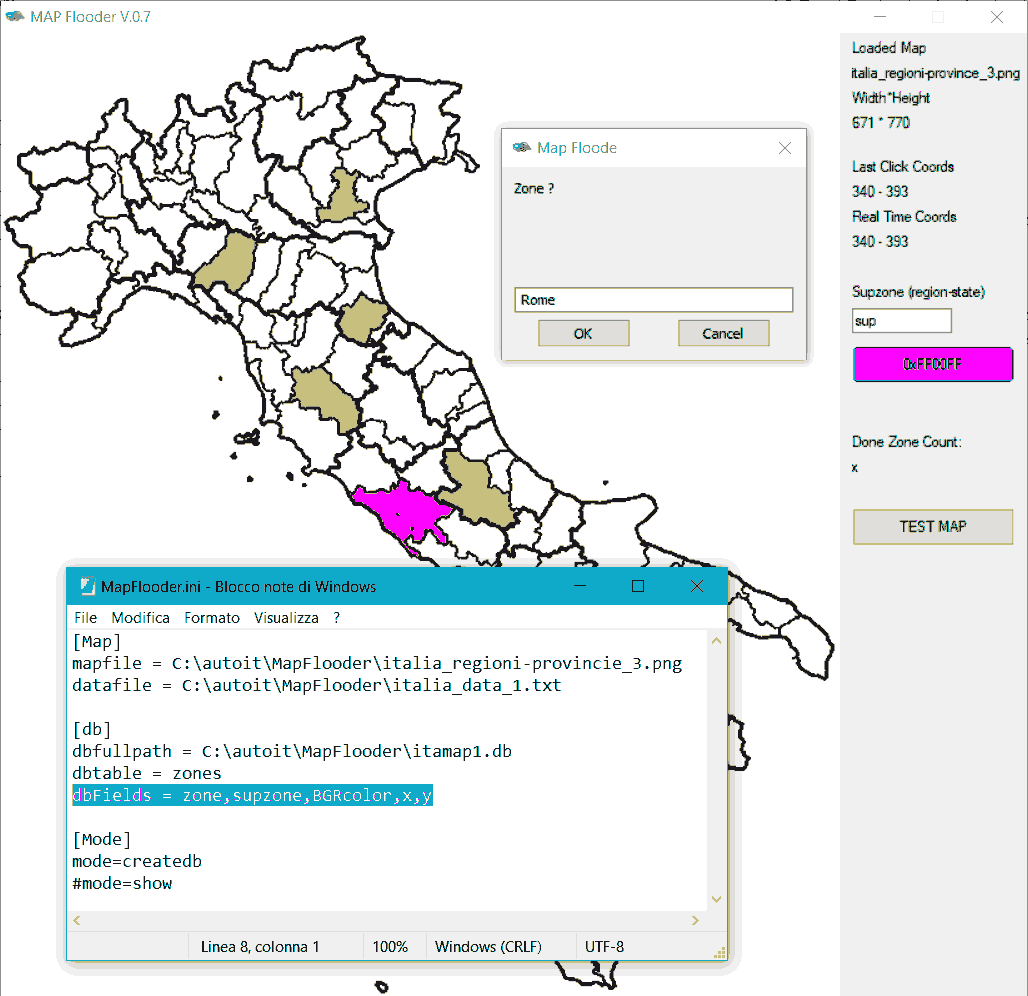
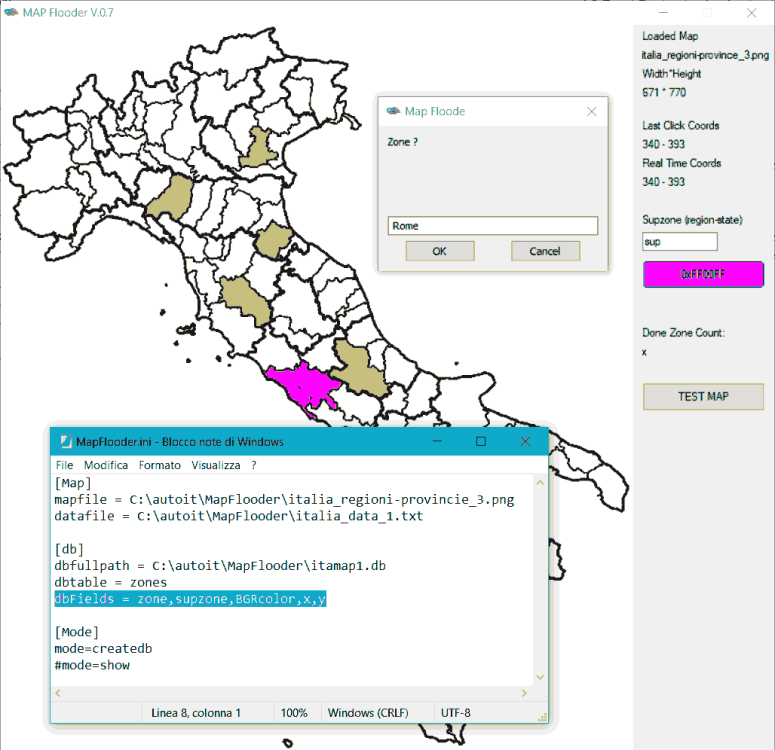
I was searching for a way to highlight zones (regions, provinces, counties, etc) on a map, and I don't need super precise maps so I wrote this script, based on picking up black and white maps (2 colors BW .png or .gif tested) and filling them with colors, writing down a sqlite database to associate zones with names (and other data as well), and reuse the map and the DB to display data, in my example reading a simple .txt file. It's all based on this thread and this other thread. So I have two modes: The Map "creation mode" : you provide a map image and you start to pick up colors, set "upper level" region/state, and by clicking on a region you fill it and you name it, and all the data are saved on a sqlite DB (auto-created) when you have the map image and a DB with the correct associations, you can switch the "mode" to "show" (as by .ini file) and the script tries to read a "datafile" showing the zone names listed in datafile. The code: #Region ;**** Directives created by AutoIt3Wrapper_GUI **** #AutoIt3Wrapper_Icon=Icone\mapFlooder.ico #EndRegion ;**** Directives created by AutoIt3Wrapper_GUI **** ;MAP Flooder ;(C) NSC 2021 #include <GUIConstants.au3> #include <_GOLLOG.au3> #include <SQLite.au3> #include <SQLite.dll.au3> #include <Misc.au3> #include <GDIPlus.au3> Opt("mousecoordmode", 2) Global $prgname = "MAP Flooder", $ver = "V.0.7", $Buttoncolor = "0xFF00FF", $MPini = @ScriptDir & "\MapFlooder.ini", $btest Global $dbfullpath, $dbtable, $dbFields, $mapfile, $FloodMode, $datafile Global $HDC, $hBrush, $hGraphics, $obj_orig Global $Pic1, $gui, $width, $height, $bColor, $realtimeCoords, $lastclickcoords, $inputSup, $zonecountNum,$labeltest #Region program Gollog(">>>>>> Start MAP Flooder " & $ver) ctrlini() Gui() SQLiteDBcreate() If $FloodMode = "createdb" Then Gollog("CreateDB Mode") DBFlooder() Else Gollog("Show MAP mode") MapShow("show") EndIf Close() #EndRegion program #Region funcS Func Gui() _GDIPlus_Startup() $Pic1 = _GDIPlus_BitmapCreateFromFile($mapfile) $width = _GDIPlus_ImageGetWidth($Pic1) $height = _GDIPlus_ImageGetHeight($Pic1) If $FloodMode = "createdb" Then $gui = GUICreate($prgname & " " & $ver, $width + 150, $height) $labelLoadedMap = GUICtrlCreateLabel("Loaded Map", $width + 10, 5) $labelLoadedMap2 = GUICtrlCreateLabel(_FileToFileName($mapfile), $width + 10, 25) $labeldim = GUICtrlCreateLabel("Width*Height", $width + 10, 45) $labeldim2 = GUICtrlCreateLabel($width & " * " & $height, $width + 10, 65) $lastclickcoordslabel = GUICtrlCreateLabel("Last Click Coords", $width + 10, 100) $lastclickcoords = GUICtrlCreateLabel("xx - xx", $width + 10, 120, 180, 20) $realtimeCoordslabel = GUICtrlCreateLabel("Real Time Coords", $width + 10, 140) $realtimeCoords = GUICtrlCreateLabel("Real Time Coords", $width + 10, 160, 80, 20) $SuPzonelabel = GUICtrlCreateLabel("Supzone (region-state)", $width + 10, 200) $inputSup = GUICtrlCreateInput("sup", $width + 10, 220, 80, 20) $bColor = GUICtrlCreateButton($Buttoncolor, $width + 10, 250, 130, 30) GUICtrlSetBkColor($bColor, $Buttoncolor) $zonecountlabel = GUICtrlCreateLabel("Done Zone Count:", $width + 10, 320, 100, 20) $zonecountNum = GUICtrlCreateLabel("x", $width + 10, 340, 100, 20) $btest = GUICtrlCreateButton("TEST MAP", $width + 10, 380, 130, 30) $labeltest = GUICtrlCreateLabel("", $width + 10, 420, 130, 30) Else $gui = GUICreate($prgname & " " & $ver, $width, $height) EndIf GUISetState() $HDC = _WinAPI_GetDC($gui) $hGraphics = _GDIPlus_GraphicsCreateFromHDC($HDC) _GDIPlus_GraphicsDrawImageRect($hGraphics, $Pic1, 0, 0, $width, $height) EndFunc ;==>Gui Func MapShow($showmode) ; reading a simple text file with zone names, searching for names in DB and fill the map using stored coordinates If $showmode = "show" Then Local $aLines = FileReadToArray($datafile) Local $iLineCount = @extended EndIf If $showmode = "test" Then $iLineCount = 1 If @error Then MsgBox(48, "MapFlooder", "There was an error reading the data file. @error: " & @error) ; Gollog("There was an error reading the data file. @error: " & @error) Close() Else Gollog("start filling zones") _SQLite_Startup() _SQLite_Open($dbfullpath) ; open Database with zone definitions Local $hQuery, $aRow For $i = 0 To $iLineCount - 1 If $showmode = "show" Then _SQLite_Query(-1, "SELECT * FROM " & $dbtable & " where zone = '" & $aLines[$i] & "' ORDER BY zone ASC;", $hQuery) ; the query EndIf If $showmode = "test" Then _SQLite_Query(-1, "SELECT * FROM " & $dbtable & " ORDER BY zone ASC;", $hQuery) ; the query EndIf While _SQLite_FetchData($hQuery, $aRow) = $SQLITE_OK $hBrush = DllCall("gdi32.dll", "long", "CreateSolidBrush", "int", $aRow[2]) ; fill color read from DB $obj_orig = DllCall("gdi32.dll", "int", "SelectObject", "int", $HDC, "int", $hBrush[0]) DllCall("gdi32.dll", "int", "FloodFill", "int", $HDC, "int", $aRow[3], "int", $aRow[4], "int", 0x000000) If $showmode = "test" Then GUICtrlSetData($labeltest,$aRow[0]) Sleep(200) GUISetState() EndIf WEnd _SQLite_QueryFinalize($hQuery) Next _SQLite_Close() _SQLite_Shutdown() EndIf While 1 $msg = GUIGetMsg() If $msg = $GUI_EVENT_CLOSE Then ExitLoop WEnd EndFunc ;==>MapShow Func DBFlooder() $zonecount = 0 While 1 $mp = MouseGetPos() GUICtrlSetData($realtimeCoords, $mp[0] & " - " & $mp[1]) $msg = GUIGetMsg() If $msg = $GUI_EVENT_CLOSE Then ExitLoop If $msg = $bColor Then colorP() If $msg = $btest Then MapShow("Test") If $mp[0] < $width And $mp[1] < $height And _IsPressed("01") And WinActive($gui) Then $mp = MouseGetPos() GUICtrlSetData($lastclickcoords, $mp[0] & " - " & $mp[1]) $hBrush = DllCall("gdi32.dll", "long", "CreateSolidBrush", "int", $Buttoncolor) ; fill color ok $obj_orig = DllCall("gdi32.dll", "int", "SelectObject", "int", $HDC, "int", $hBrush[0]) DllCall("gdi32.dll", "int", "FloodFill", "int", $HDC, "int", $mp[0], "int", $mp[1], "int", 0x000000) Local $Zone = InputBox("Map Floode", "Zone ?") If $Zone = "" Or @error = 1 Then ; when manage wrong click, possibility to repeat ; set 'temp' color to highlight the 'wrong' click $hBrush = DllCall("gdi32.dll", "long", "CreateSolidBrush", "int", 0x4ccfc6) ; fill color wrong $obj_orig = DllCall("gdi32.dll", "int", "SelectObject", "int", $HDC, "int", $hBrush[0]) DllCall("gdi32.dll", "int", "FloodFill", "int", $HDC, "int", $mp[0], "int", $mp[1], "int", 0x000000) ; restore color $hBrush = DllCall("gdi32.dll", "long", "CreateSolidBrush", "int", $Buttoncolor) ; fill color ok $obj_orig = DllCall("gdi32.dll", "int", "SelectObject", "int", $HDC, "int", $hBrush[0]) Else _SQLite_Startup() _SQLite_Open($dbfullpath) ; open Database Local $SupZone = GUICtrlRead($inputSup) Local $data = '"' & $Zone & '","' & $SupZone & '","' & $Buttoncolor & '",' & $mp[0] & "," & $mp[1] _SQLite_Exec(-1, "INSERT INTO " & $dbtable & "(" & $dbFields & ") VALUES (" & $data & ");") If @error = -1 Then GOLLOG("Error insert record") MsgBox(48, "Error", "insert record") EndIf $zonecount += 1 GUICtrlSetData($zonecountNum, $zonecount) _SQLite_Close() _SQLite_Shutdown() EndIf EndIf WEnd EndFunc ;==>DBFlooder Func Close() Gollog("<<<<<<< closing...") _WinAPI_ReleaseDC($gui, $HDC) _GDIPlus_GraphicsDispose($hGraphics) _GDIPlus_Shutdown() Exit EndFunc ;==>Close Func SQLiteDBcreate() ;complete path e filename If Not FileExists($dbfullpath) Then GOLLOG("perform SQLite DB creation") Local $dbfolder = _FileToFilePath($dbfullpath) ;Local $dbfile = _FileToFileName($dbfullpath) If Not FileExists($dbfolder) Then DirCreate($dbfolder) ; =====================>>>>> START SQL DLL _SQLite_Startup() _SQLite_Open($dbfullpath) ; open Database ; creating first table If _SQLite_Exec(-1, "CREATE TABLE " & $dbtable & " (" & $dbFields & ");") = $SQLITE_OK Then GOLLOG("DB table - " & $dbtable & " - creation ok") Else GOLLOG("Error creating DB table : " & @error) EndIf _SQLite_Close() _SQLite_Shutdown() Else Gollog("DB already exist") EndIf EndFunc ;==>SQLiteDBcreate ; #FUNCTION# ==================================================================================================================== ; Name ..........: _FileToFilePath ; Description ...: Returns a folder path from a FQPN (Fully Qualified Path Name) ; Syntax ........: _FileToFilePath($sPath) ; Parameters ....: $sPath - a string value. ; Return values .: Success - String ; Failure - Empty string as returned from StringLeft() ; Author ........: Sam Coates ; =============================================================================================================================== Func _FileToFilePath($sPath) Local $sReturn = StringLeft($sPath, StringInStr($sPath, "\", 0, -1) - 1) Return ($sReturn) EndFunc ;==>_FileToFilePath ; #FUNCTION# ==================================================================================================================== ; Name ..........: _FileToFileName ; Description ...: Returns a filename from a FQPN (Fully Qualified Path Name) ; Syntax ........: _FileToFileName($sPath[, $bIncludeExtension = True]) ; Parameters ....: $sPath - a string value. ; $bIncludeExtension - [optional] a boolean value. Default is True. ; Return values .: Success - String ; Failure - Empty string as returned from StringLeft() ; Author ........: Sam Coates ; =============================================================================================================================== Func _FileToFileName($sPath, $bIncludeExtension = True) Local $sReturn = StringTrimLeft($sPath, StringInStr($sPath, "\", 0, -1)) If $bIncludeExtension = False Then $sReturn = StringLeft($sReturn, StringInStr($sReturn, ".", 0, -1) - 1) Return ($sReturn) EndFunc ;==>_FileToFileName Func colorP() ; modified for BGR color GOLLOG("Color Picker") Local $color = _ChooseColor(2) If $color = -1 Then GOLLOG("no color selected") Else Local $sCr = Hex($color, 6) Local $RGB_Buttoncolor = '0x' & StringMid($sCr, 1, 2) & StringMid($sCr, 3, 2) & StringMid($sCr, 5, 2) GUICtrlSetBkColor($bColor, $RGB_Buttoncolor) ; BGR color $Buttoncolor = '0x' & StringMid($sCr, 5, 2) & StringMid($sCr, 3, 2) & StringMid($sCr, 1, 2) GUICtrlSetData($bColor, $Buttoncolor) GOLLOG("new color " & $Buttoncolor & " selected") EndIf EndFunc ;==>colorP Func ctrlini() ;ini read If FileExists($MPini) Then GOLLOG("found: " & $MPini) $mapfile = IniRead($MPini, "map", "mapfile", "") $datafile = IniRead($MPini, "map", "datafile", "") $dbfullpath = IniRead($MPini, "db", "dbfullpath", "") $dbtable = IniRead($MPini, "db", "dbtable", "") $dbFields = IniRead($MPini, "db", "dbfields", "") $FloodMode = IniRead($MPini, "mode", "mode", "") Else GOLLOG($MPini & " NOT found..") Close() EndIf EndFunc ;==>ctrlini #EndRegion funcS All the needed files plus some example (image maps and DBs) Link to all demo files To test, copy all in a single folder and adjust the mapflooder.ini, also you can add to you includes the _gollog.au3 (used for log, you can avoid it deleting all Gollog() lines)
-
Hi Trying this from autoit v3.3.14.5 and SCITE 3.19.102.1901.0 : help file , page "Language Reference - Variables" , sample autoit script about maps: Maps must be declared before use by defining their scope using the 'Global/Local/Static' keywords. Local $mControls[] So is my test script : only with this local declation. -check syntax is OK - running script : test.au3" (13) : ==> Variable subscript badly formatted.: Local $mControls[] Local $mControls[^ ERROR ->14:51:49 AutoIt3.exe ended.rc:1 any clue ?
-
Hi All, A co-worker complained that the side keys on his mouse (back and forward) were getting in the way. This script allows you to disable/re-purpose those buttons. Have only tested with a Delux M618 mouse. Haven't tested under Windows 10. This is the standalone version of the script so it will look ugly. The (cleaner) version we're using has a bunch of server calls and auto-update checks. Please report any problems here; even if you fix them yourself. Learning curve etc. #include <Misc.au3> #include <WinAPI.au3> #include <GuiComboBoxEx.au3> #include <ComboConstants.au3> #include <StaticConstants.au3> #include <WindowsConstants.au3> Global $gLastHotKeyPressed = ""; Last Hot key pressed Global $gLastHotKeyType = "" ; Last Hot key pressed type Global Const $MSLLHOOKSTRUCT = $tagPOINT & ";dword mouseData;dword flags;dword time;ulong_ptr dwExtraInfo" Global Const $MOUSETRAPEVENT_DUMMY = "_MouseTrapEvent_Dummy" Global $currentEvent[2] Global $currentDownEvent[2] Global $lastEvent = "" Global $iLBUTTONDOWN = 0 Global $iRBUTTONDOWN = 0 Global $iMBUTTONDOWN = 0 Global $iXBUTTONDOWNNumber = 0 ; 1 or 2 xtra buttons Global $LRClickStatus = 0 Global $RLClickStatus = 0 Global $LRDrag = 0 Global $RLDrag = 0 Global $LMDrag = 0 Global $RMDrag = 0 Global $doubleClickTime = 400 Global $gLastMouseEventPressed = "" ; Added for HotKeySetEx UDF ;Global $gLastHotKeyPressed = ""; Last Hot key pressed Added for HotKeySetEx UDF ;Global $gLastHotKeyType = "" ; Last Hot key pressed type Added for HotKeySetEx UDF ; Mouse On event variables Global $a__MSOE_Events[1][1] Global $a__MSOE_DblClk_Data = __MouseTrapEvent_GetDoubleClickData() $doubleClickTime = $a__MSOE_DblClk_Data[0] + 50 Global $hKey_Proc Global $hM_Module Global $hM_Hook If _Singleton("MouseKeyModifier.exe", 1) = 0 Then MsgBox(0, "Warning", "Mouse Key Modifier is already running.") Exit EndIf TrayTip("MKM", "MouseKeyModifier is running. Click here for options", 30) Global $sHotKeyBack = "" Global $sHotKeyForward = "" Opt("TrayMenuMode", 1) Main() Func Main() HotKeySetEx("{XClick12}", "_FuncDummy", 1) Local $tMsg Local Static $aArray = _MouseKeyModifierTrayCreate() Local Static $cTraySettings = $aArray[1] Local Static $cTrayBehaviour = $aArray[2] Local Static $cTrayBehaviourStandard = $aArray[3] Local Static $cTrayBehaviourCustom = $aArray[4] Local Static $cTrayBehaviourStartup = $aArray[5] Local Static $cTrayQuickDisable = $aArray[6] Local Static $cTrayExit = $aArray[7] Local Static $sCurrentBehaviour = IniRead(@ScriptDir & "\config.ini", "DefaultBehaviour", "Hotkey", "Standard") If $sCurrentBehaviour = "Standard" Then TrayItemSetState($cTrayBehaviourStandard, 1) ElseIf $sCurrentBehaviour = "Custom" Then TrayItemSetState($cTrayBehaviourCustom, 1) _HotKeysSet() ElseIf $sCurrentBehaviour = "Disable" Then TrayItemSetState($cTrayQuickDisable, 1) _HotKeysQuickDisable(True) EndIf While 1 $tMsg = TrayGetMsg() Switch $tMsg Case $cTraySettings TraySetState(2) TrayItemSetState($cTraySettings, 4) _HotKeysUpdateSettingsGuiLoop($sCurrentBehaviour) TraySetState(1) Case $cTrayBehaviourStandard _HotKeysQuickDisable(False) TrayItemSetState($cTrayQuickDisable, 4) TrayItemSetState($cTrayBehaviourStandard, 1) TrayItemSetState($cTrayBehaviourCustom, 4) $sCurrentBehaviour = "Standard" Case $cTrayBehaviourCustom _HotKeysQuickDisable(False) TrayItemSetState($cTrayQuickDisable, 4) TrayItemSetState($cTrayBehaviourStandard, 4) TrayItemSetState($cTrayBehaviourCustom, 1) $sCurrentBehaviour = "Custom" _HotKeysSet() Case $cTrayQuickDisable If BitAND(TrayItemGetState($cTrayQuickDisable), 1) = 1 Then _HotKeysQuickDisable(True) TrayItemSetState($cTrayQuickDisable, 1) TrayItemSetState($cTrayBehaviourStandard, 4) TrayItemSetState($cTrayBehaviourCustom, 4) ElseIf BitAND(TrayItemGetState($cTrayQuickDisable), 4) = 4 Then _HotKeysQuickDisable(False) TrayItemSetState($cTrayQuickDisable, 4) If $sCurrentBehaviour = "Standard" Then TrayItemSetState($cTrayBehaviourStandard, 1) TrayItemSetState($cTrayBehaviourCustom, 4) ElseIf $sCurrentBehaviour = "Custom" Then TrayItemSetState($cTrayBehaviourStandard, 4) TrayItemSetState($cTrayBehaviourCustom, 1) _HotKeysSet() ElseIf $sCurrentBehaviour = "Disable" Then $sCurrentBehaviour = "Standard" TrayItemSetState($cTrayBehaviourStandard, 1) TrayItemSetState($cTrayBehaviourCustom, 4) EndIf EndIf Case $cTrayBehaviourStartup TraySetState(2) If BitAND(TrayItemGetState($cTrayBehaviourStandard), 1) = 1 Then IniWrite(@ScriptDir & "\config.ini", "DefaultBehaviour", "Hotkey", "Standard") MsgBox(0, "Success", "'Standard' set as default at startup.") ElseIf BitAND(TrayItemGetState($cTrayBehaviourCustom), 1) = 1 Then IniWrite(@ScriptDir & "\config.ini", "DefaultBehaviour", "Hotkey", "Custom") MsgBox(0, "Success", "'Custom' set as default at startup.") ElseIf BitAND(TrayItemGetState($cTrayQuickDisable), 1) = 1 Then IniWrite(@ScriptDir & "\config.ini", "DefaultBehaviour", "Hotkey", "Disable") MsgBox(0, "Success", "'Disabled' set as default at startup.") EndIf TraySetState(1) TrayItemSetState($cTrayBehaviourStartup, 4) Case $cTrayExit Exit EndSwitch WEnd EndFunc ;==>Main Func _CheckDeselect($cFrom, $cTo) Local $i For $i = $cFrom To $cTo GUICtrlSetState($i, 4) Next Return (1) EndFunc ;==>_CheckDeselect Func _CheckToString($cCheckWin, $cCheckCtrl, $cCheckAlt, $cCheckShift) Local $sReturn = "" Local $i If GUICtrlRead($cCheckWin) = 1 Then $sReturn &= "#" If GUICtrlRead($cCheckCtrl) = 1 Then $sReturn &= "^" If GUICtrlRead($cCheckAlt) = 1 Then $sReturn &= "!" If GUICtrlRead($cCheckShift) = 1 Then $sReturn &= "+" Return ($sReturn) EndFunc ;==>_CheckToString Func _ComboDeselect($hWnd, $cControl) ControlCommand($hWnd, "", $cControl, "SetCurrentSelection", "-1") Return (1) EndFunc ;==>_ComboDeselect Func _ControlDisable($cFrom, $cTo, $bDisable = True) Local $i For $i = $cFrom To $cTo If $bDisable = True Then GUICtrlSetState($i, 4 + 128) Else GUICtrlSetState($i, 4 + 64) EndIf Next Return (1) EndFunc ;==>_ControlDisable Func _FuncDummy() Return (1) EndFunc ;==>_FuncDummy Func _FuncHotKeyBack() Send($sHotKeyBack) Return (1) EndFunc ;==>_FuncHotKeyBack Func _FuncHotKeyForward() Send($sHotKeyForward) Return (1) EndFunc ;==>_FuncHotKeyForward Func _HotKeysAssign($sMouseButton, $sString) If $sMouseButton = "Back" Then HotKeySetEx("{XClick1}", "_FuncHotKeyBack", 1) HotKeySetEx("{XDClick1}", "_FuncHotKeyBack", 1) ElseIf $sMouseButton = "Forward" Then HotKeySetEx("{XClick2}", "_FuncHotKeyForward", 1) HotKeySetEx("{XDClick2}", "_FuncHotKeyForward", 1) EndIf Return (1) EndFunc ;==>_HotKeysAssign Func _HotKeysUpdateSettingsGuiLoop($sCurrentBehaviour) Local Static $aArray = _MouseKeyModifierSettingsGuiCreate() Local Static $cGui = $aArray[1] Local Static $cComboButton = $aArray[2] Local Static $cCheckWin = $aArray[3] Local Static $cCheckCtrl = $aArray[4] Local Static $cCheckAlt = $aArray[5] Local Static $cCheckShift = $aArray[6] Local Static $cComboCharacter = $aArray[7] Local Static $cCheckDisable = $aArray[8] Local Static $cButtonSave = $aArray[9] Local Static $cButtonCancel = $aArray[10] GUICtrlSetState($cCheckWin, 4) GUICtrlSetState($cCheckCtrl, 4) GUICtrlSetState($cCheckAlt, 4) GUICtrlSetState($cCheckShift, 4) _ComboDeselect($cGui, $cComboButton) _ComboDeselect($cGui, $cComboCharacter) Local $sStringToSave = "", $sButtonToSave = "" Local $iIndex GUISetState(@SW_SHOW, $cGui) While 1 $nMsg = GUIGetMsg() Switch $nMsg Case -3, $cButtonCancel GUISetState(@SW_HIDE, $cGui) Return Case $cComboButton ConsoleWrite(GUICtrlRead($cComboButton) & @CRLF) _ComboDeselect($cGui, $cComboCharacter) _HotKeysUpdateSettingsGuiControls(GUICtrlRead($cComboButton), $cCheckWin, $cCheckCtrl, $cCheckAlt, $cCheckShift, $cComboCharacter) Case $cCheckDisable ConsoleWrite(GUICtrlRead($cCheckDisable) & @CRLF) If GUICtrlRead($cCheckDisable) = 1 Then _ControlDisable($cCheckWin, $cComboCharacter, True) _ComboDeselect($cGui, $cComboCharacter) ElseIf GUICtrlRead($cCheckDisable) = 4 Then _ControlDisable($cCheckWin, $cComboCharacter, False) EndIf Case $cButtonSave $sButtonToSave = GUICtrlRead($cComboButton) If $sButtonToSave = "" Then MsgBox(0, "Error", "You must select a button to modify.", 0, $cGui) ContinueLoop EndIf If GUICtrlRead($cCheckDisable) = 1 Then _HotKeysSaveToFile($sButtonToSave, "{EMPTY}") Else $sStringToSave = _CheckToString($cCheckWin, $cCheckCtrl, $cCheckAlt, $cCheckShift) $iIndex = _GUICtrlComboBox_GetCurSel($cComboCharacter) If $iIndex <> -1 Then $sStringToSave &= GUICtrlRead($cComboCharacter) If $sStringToSave = "" Then $sStringToSave = "{EMPTY}" _HotKeysSaveToFile($sButtonToSave, $sStringToSave) EndIf _CheckDeselect($cCheckWin, $cCheckShift) _CheckDeselect($cCheckDisable, $cCheckDisable) _ComboDeselect($cGui, $cComboButton) _ComboDeselect($cGui, $cComboCharacter) If $sCurrentBehaviour = "Custom" Then _HotKeysSet() EndSwitch WEnd EndFunc ;==>_HotKeysUpdateSettingsGuiLoop Func _HotKeysUpdateSettingsGuiControls($sButton, $cCheckWin, $cCheckCtrl, $cCheckAlt, $cCheckShift, $cComboCharacter) Local $sHotKey = _HotKeysGet($sButton) GUICtrlSetState($cCheckWin, 4) GUICtrlSetState($cCheckCtrl, 4) GUICtrlSetState($cCheckAlt, 4) GUICtrlSetState($cCheckShift, 4) If StringInStr($sHotKey, "#") <> 0 Then GUICtrlSetState($cCheckWin, 1) If StringInStr($sHotKey, "^") <> 0 Then GUICtrlSetState($cCheckCtrl, 1) If StringInStr($sHotKey, "!") <> 0 Then GUICtrlSetState($cCheckAlt, 1) If StringInStr($sHotKey, "+") <> 0 Then GUICtrlSetState($cCheckShift, 1) $sHotKey = StringReplace($sHotKey, "#", "") $sHotKey = StringReplace($sHotKey, "^", "") $sHotKey = StringReplace($sHotKey, "!", "") $sHotKey = StringReplace($sHotKey, "+", "") $sHotKey = StringLower($sHotKey) If $sHotKey <> "" Then If StringLen($sHotKey) > 1 Then Return (SetError(-1, 0, "")) ConsoleWrite($sHotKey & @CRLF) If Asc($sHotKey) < 97 Or Asc($sHotKey) > 122 Then Return (SetError(-2, 0, "")) EndIf Local $iIndex = _GUICtrlComboBox_SelectString($cComboCharacter, $sHotKey) Return (1) EndFunc ;==>_HotKeysUpdateSettingsGuiControls Func _HotKeysGet($sButton) Local $sHotKey = IniRead(@ScriptDir & "\config.ini", $sButton, "Hotkey", "*") If @error Or $sHotKey = "*" Then Return (SetError(-1, 0, "{EMPTY}")) Return ($sHotKey) EndFunc ;==>_HotKeysGet Func _HotKeysQuickDisable($bDisable = True) If $bDisable = True Then HotKeySetEx("{XClick1}", "_FuncDummy", 1) HotKeySetEx("{XClick2}", "_FuncDummy", 1) HotKeySetEx("{XDClick1}", "_FuncDummy", 1) HotKeySetEx("{XDClick2}", "_FuncDummy", 1) Else HotKeySetEx("{XClick1}", "") HotKeySetEx("{XClick2}", "") HotKeySetEx("{XDClick1}", "") HotKeySetEx("{XDClick2}", "") EndIf EndFunc ;==>_HotKeysQuickDisable Func _HotKeysSaveToFile($sMouseButton, $sString) IniWrite(@ScriptDir & "\config.ini", $sMouseButton, "Hotkey", $sString) Return (1) EndFunc ;==>_HotKeysSaveToFile Func _HotKeysSet() Local $sHotKey = _HotKeysGet("Back") If $sHotKey <> "{EMPTY}" Then _HotKeysAssign("Back", $sHotKey) $sHotKeyBack = $sHotKey $sHotKey = _HotKeysGet("Forward") If $sHotKey <> "{EMPTY}" Then _HotKeysAssign("Forward", $sHotKey) $sHotKeyForward = $sHotKey Return (1) EndFunc ;==>_HotKeysSet Func _MouseKeyModifierTrayCreate() Local $aArray[8] = [7] $aArray[1] = TrayCreateItem("Settings") $aArray[2] = TrayCreateMenu("Behaviour") $aArray[3] = TrayCreateItem("Standard", $aArray[2]) $aArray[4] = TrayCreateItem("Custom", $aArray[2]) TrayCreateItem("", $aArray[2]) $aArray[5] = TrayCreateItem("Set at Startup", $aArray[2]) $aArray[6] = TrayCreateItem("Quick disable") $aArray[7] = TrayCreateItem("Exit") Return ($aArray) EndFunc ;==>_MouseKeyModifierTrayCreate Func _MouseKeyModifierSettingsGuiCreate() Local $aArray[11] = [10] $aArray[1] = GUICreate("Settings", 276, 171) $aArray[2] = GUICtrlCreateCombo("", 20, 19, 236, 21, BitOR(0x0003, 0x00200000)) GUICtrlSetData(-1, "Back|Forward") $aArray[3] = GUICtrlCreateCheckbox("Win", 20, 54, 38, 20) $aArray[4] = GUICtrlCreateCheckbox("Ctrl", 65, 54, 38, 20) $aArray[5] = GUICtrlCreateCheckbox("Alt", 110, 54, 38, 20) $aArray[6] = GUICtrlCreateCheckbox("Shift", 155, 54, 41, 20) GUICtrlCreateLabel("", 20, 87, 237, 1, 0x10, -1) GUICtrlSetBkColor(-1, "-2") $aArray[7] = GUICtrlCreateCombo("", 207, 53, 50, 21, BitOR(0x0003, 0x00200000)) GUICtrlSetData(-1, _AlphabetGenerate()) $aArray[8] = GUICtrlCreateCheckbox("Disable button", 96, 100, 86, 20) $aArray[9] = GUICtrlCreateButton("Save", 20, 134, 76, 25) $aArray[10] = GUICtrlCreateButton("Cancel", 181, 134, 76, 25) Return ($aArray) EndFunc ;==>_MouseKeyModifierSettingsGuiCreate Func _AlphabetGenerate($sSeparator = "|") Local $sReturn = "" Local $i For $i = 97 To 122 $sReturn &= Chr($i) If $i <> 122 Then $sReturn &= $sSeparator Next ConsoleWrite($sReturn & @CRLF) Return ($sReturn) EndFunc ;==>_AlphabetGenerate Func HotKeySetEx($hotkey, $fun, $block = 1) ; default 1 block 0 intercept allow normal behavour and only for mouse events ; if the the hot key name contains the word CLICK then its a mouse button. If StringInStr(StringUpper($hotkey), "CLICK") > 0 Then ; Mouse hot key Dim $mouseHotKey ; local $mouseHotKey = $hotkey $mouseHotKey = StringReplace($mouseHotKey, "{", "") ; remove { } for mousetrap interface $mouseHotKey = StringReplace($mouseHotKey, "}", "") If $fun = "" Then _MouseTrapEvent($mouseHotKey) ; deregister Else _MouseTrapEvent($mouseHotKey, $fun, $block) ; 1 = block action and redirect to $fun EndIf Else HotKeySet($hotkey, $fun) ; normal AutoIt EndIf EndFunc ;==>HotKeySetEx Func getLastHotKey() ; call this in your function. Equivalent to @HotKeyPressed see example script setLastHotKey() Return $gLastHotKeyPressed ; EndFunc ;==>getLastHotKey Func getLastHotKeyType() ; call this in your function. Optional if you want type KEYBOARD or MOUSE setLastHotKey() Return $gLastHotKeyType ; EndFunc ;==>getLastHotKeyType Func setLastHotKey() ; Dim $sLastMouseEventPressed $sLastMouseEventPressed = __MouseTrapEvent_getLastMouseEventPressed() If $sLastMouseEventPressed <> "" Then $gLastHotKeyPressed = "{" & $sLastMouseEventPressed & "}" $gLastHotKeyType = "Mouse" Else $gLastHotKeyPressed = @HotKeyPressed $gLastHotKeyType = "Keyboard" EndIf Return $gLastHotKeyPressed ; EndFunc ;==>setLastHotKey ; #FUNCTION# ==================================================================================================== ; Name...........: _MouseTrapEvent ; Description....: Set an events handler (a hook) for Mouse device based on MouseSetEvent.udf. ; Syntax.........: _MouseTrapEvent($iEvent, $sFuncName = "", $hTargetWnd = 0, $iBlockDefProc = -1, $vParam = "") ; Parameters.....: $sEvent - The event to set, here is the list of ; supported event stings:- Case InSensitive! ; ; single clicks ; LClick - left button click (Primary) ; MClick - middle button click (Wheel click) ; RClick - right button click (Secondary) ; XClick1 - Xtra button 1 click (usually 'back navigaton') ; XClick2 - Xtra button 2 click (usually 'forward navigaton') ; double clicks ; LDClick - left button (Primary) ; MDClick - middle button (Wheel click) ; RDClick - right button (Secondary) ; XDClick1 - Xtra button 1 (usually 'back navigaton') ; XDClick2 - Xtra button 2 (usually 'forward navigaton') ; psuedo double clicks ('chords') - ; XClick12 - Xtra button 1&2 pressed at the same time. ; ; OTHER EVENTS you'll have to work out yourself eg mouse wheel scroll - see code. ; $sFuncName - [Optional] Function name to call when the event is triggered. ; If this parameter is empty string ("") or omited, the function will *unset* the $iEvent. ; ; $iBlockDefProc - [Optional] Defines if the up event should be blocked (actualy block the mouse action). ; If this parameter = ; -1 (default), user defined event function defines whether to block or not ; 1 (call function and block) ; 0 (call function and continue normal mouse behaviour). ; Note for all click and double click events the down event is always blocked to prevent hanging. ; ; ; $vParam - [Optional] Parameter to pass to the event function ($sFuncName). ; ; Return values..: Success - If the event is set in the first time, or when the event is unset properly, the return is 1, ; if it's set on existing event, the return is 2. ; Failure - Returns 0 on UnSet event mode when there is no set events yet. ; Author.........: credits G.Sandler (Mr)CreatoR ; Remarks........: ; 2) Blocking of $sFuncName function by window messages with commands ; such as "Msgbox()" can lead to unexpected behavior, the return to the system should be as fast as possible! ; Related........: MouseSetEvent.udf ; Link...........: ; Example........: Yes. ; =============================================================================================================== Func _MouseTrapEvent($iEvent, $sFuncName = "", $iBlockDefProc = -1, $vParam = "") Local $i Local $iUserEventCount = 0 Local $hTargetWnd = 0 ; not used $iEvent = StringReplace(StringUpper($iEvent), "CLICK", "Click") ; make case insensitive, to do Drag and Wheel and Up Down If $sFuncName = "" Then ;Unset Event If $a__MSOE_Events[0][0] < 1 Then Return 0 EndIf Local $aTmp_Mouse_Events[1][1] = [[0]] For $i = 1 To $a__MSOE_Events[0][0] ; keep events that don't match or internal dummy events used for double clicks. If $a__MSOE_Events[$i][0] <> $iEvent Or $a__MSOE_Events[$i][1] = $MOUSETRAPEVENT_DUMMY Then $aTmp_Mouse_Events[0][0] += 1 ReDim $aTmp_Mouse_Events[$aTmp_Mouse_Events[0][0] + 1][5] $aTmp_Mouse_Events[$aTmp_Mouse_Events[0][0]][0] = $a__MSOE_Events[$i][0] $aTmp_Mouse_Events[$aTmp_Mouse_Events[0][0]][1] = $a__MSOE_Events[$i][1] $aTmp_Mouse_Events[$aTmp_Mouse_Events[0][0]][2] = $a__MSOE_Events[$i][2] $aTmp_Mouse_Events[$aTmp_Mouse_Events[0][0]][3] = $a__MSOE_Events[$i][3] $aTmp_Mouse_Events[$aTmp_Mouse_Events[0][0]][4] = $a__MSOE_Events[$i][4] If $a__MSOE_Events[$i][1] <> $MOUSETRAPEVENT_DUMMY Then $iUserEventCount += 1 EndIf EndIf Next $a__MSOE_Events = $aTmp_Mouse_Events If $iUserEventCount < 1 Then __MouseTrapEvent_Close() EndIf Return 1 EndIf ;First event If $a__MSOE_Events[0][0] < 1 Then ;Register callback $hKey_Proc = DllCallbackRegister("_MouseTrapEvent_MouseProc", "int", "int;ptr;ptr") $hM_Module = DllCall("kernel32.dll", "hwnd", "GetModuleHandle", "ptr", 0) $hM_Hook = DllCall("user32.dll", "hwnd", "SetWindowsHookEx", "int", $WH_MOUSE_LL, "ptr", DllCallbackGetPtr($hKey_Proc), "hwnd", $hM_Module[0], "dword", 0) EndIf ;Search thru events, and if the event already set, we just (re)set the new function and other parameters For $i = 1 To $a__MSOE_Events[0][0] If $a__MSOE_Events[$i][0] = $iEvent Then If $sFuncName = $MOUSETRAPEVENT_DUMMY Then ; event already handled by user - no need for dummy event Return 1 EndIf $a__MSOE_Events[$i][0] = $iEvent $a__MSOE_Events[$i][1] = $sFuncName $a__MSOE_Events[$i][2] = $hTargetWnd $a__MSOE_Events[$i][3] = $iBlockDefProc $a__MSOE_Events[$i][4] = $vParam Return 2 EndIf Next $a__MSOE_Events[0][0] += 1 ReDim $a__MSOE_Events[$a__MSOE_Events[0][0] + 1][5] $a__MSOE_Events[$a__MSOE_Events[0][0]][0] = $iEvent $a__MSOE_Events[$a__MSOE_Events[0][0]][1] = $sFuncName $a__MSOE_Events[$a__MSOE_Events[0][0]][2] = $hTargetWnd $a__MSOE_Events[$a__MSOE_Events[0][0]][3] = $iBlockDefProc $a__MSOE_Events[$a__MSOE_Events[0][0]][4] = $vParam ; if double click event - attempt to register a dummmy event for single click if one dosen't exist- to prevent hanging If StringInStr($iEvent, "DClick") > 0 Then _MouseTrapEvent(StringReplace($iEvent, "DClick", "Click"), $MOUSETRAPEVENT_DUMMY, 0, 0) EndIf ; if multi button click event - attempt to register a dummmy single click event for each button - to prevent hanging If $iEvent = "XClick12" Then _MouseTrapEvent("XClick1", $MOUSETRAPEVENT_DUMMY, 0, 0) _MouseTrapEvent("XClick2", $MOUSETRAPEVENT_DUMMY, 0, 0) EndIf Return 1 EndFunc ;==>_MouseTrapEvent Func _MouseTrapEvent_Dummy() ; dummy function for unregistered click events of double clicks Return 0; EndFunc ;==>_MouseTrapEvent_Dummy Func _MouseTrapEvent_MouseProc($nCode, $wParam, $lParam) Local $info, $mouseData, $time, $timeDiff If $nCode < 0 Then $ret = DllCall("user32.dll", "long", "CallNextHookEx", "hwnd", $hM_Hook[0], _ "int", $nCode, "ptr", $wParam, "ptr", $lParam) Return $ret[0] EndIf $info = DllStructCreate($MSLLHOOKSTRUCT, $lParam) $mouseData = DllStructGetData($info, 3) $time = DllStructGetData($info, 5) $timeDiff = $time - $currentEvent[1] Select Case $wParam = $WM_MOUSEMOVE ;Test for Drag in here If $currentEvent[0] <> "LDrag" Or $currentEvent[0] <> "LRDrag" Or $currentEvent[0] <> "LMDrag" Then If $iLBUTTONDOWN = 1 Then $currentEvent[0] = "LDrag" If $iRBUTTONDOWN = 1 Then $currentEvent[0] = "LRDrag" $LRDrag = 2 EndIf EndIf EndIf If $currentEvent[0] <> "RDrag" Or $currentEvent[0] <> "RMDrag" Or $currentEvent[0] <> "LRDrag" Then If $iRBUTTONDOWN = 1 Then $currentEvent[0] = "RDrag" EndIf EndIf If $currentEvent[0] <> "MDrag" Then If $iMBUTTONDOWN = 1 Then $currentEvent[0] = "MDrag" $currentEvent[1] = $time EndIf EndIf If $iRBUTTONDOWN = 1 And $iMBUTTONDOWN = 1 And $currentEvent[0] <> "RMDrag" Then $RMDrag = 2 $currentEvent[0] = "RMDrag" $currentEvent[1] = $time EndIf If $iLBUTTONDOWN = 1 And $iMBUTTONDOWN = 1 And $currentEvent[0] <> "LMDrag" Then $LMDrag = 2 $currentEvent[0] = "LMDrag" $currentEvent[1] = $time EndIf Case $wParam = $WM_MOUSEWHEEL If _WinAPI_HiWord($mouseData) > 0 Then ;Wheel Up $currentEvent[0] = "WheelUp" $currentEvent[1] = $time Else ;Wheel Down $currentEvent[0] = "WheelDown" $currentEvent[1] = $time EndIf Case $wParam = $WM_LBUTTONDOWN ;Register Button Down, check for Right/Left If $currentEvent[0] = "RClick" Then $LRClickStatus = 1 EndIf $iLBUTTONDOWN = 1 $currentDownEvent[0] = 'LClick' Case $wParam = $WM_LBUTTONUP ;Update $iLBUTTONDOWN $iLBUTTONDOWN = 0 $currentDownEvent[0] = '' ;Test for Right/Left Click If $RLClickStatus = 1 And ($timeDiff) < $doubleClickTime Then $currentEvent[0] = "RLClick" $currentEvent[1] = $time EndIf If $lastEvent = "LClick" And ($timeDiff) < $doubleClickTime Then $currentEvent[0] = "LDClick" $currentEvent[1] = $time EndIf ;Test for Drops If $currentEvent[0] = "LDrag" Then $currentEvent[0] = "LDrop" $currentEvent[1] = $time EndIf If $LRDrag = 2 And $iRBUTTONDOWN = 1 Then $LRDrag = 1 ; Denote $LRDrag as still having one button clicked, need to register the drop on RButton up EndIf If $LRDrag = 1 And $iRBUTTONDOWN = 0 Then $currentEvent[0] = "LRDrop" $currentEvent[1] = $time $LRDrag = 0 EndIf If $LMDrag = 2 And $iMBUTTONDOWN = 1 Then $LMDrag = 1 ; Denote $LMDrag as still having one button clicked, need to register the drop on MButton up EndIf If $LMDrag = 1 And $iMBUTTONDOWN = 0 Then $currentEvent[0] = "LMDrop" $currentEvent[1] = $time $LMDrag = 0 EndIf ;Set LClick if other events haven't fired If $currentEvent[1] <> $time Then $currentEvent[0] = "LClick" $currentEvent[1] = $time EndIf ;Negate $LRClickStatus $RLClickStatus = 0 Case $wParam = $WM_RBUTTONDOWN ;Register Button Down If $currentEvent[0] = "LClick" Then $RLClickStatus = 1 EndIf $iRBUTTONDOWN = 1 $currentDownEvent[0] = 'RClick' Case $wParam = $WM_RBUTTONUP ;Test for Left, Right, and Right Doubleclick here ;Update $iRBUTTONDOWN $iRBUTTONDOWN = 0 $currentDownEvent[0] = ''; ;Test for Right/Left Click If $LRClickStatus = 1 And ($timeDiff) < $doubleClickTime Then $currentEvent[0] = "LRClick" $currentEvent[1] = $time EndIf If $lastEvent = "RClick" And ($timeDiff) < $doubleClickTime Then $currentEvent[0] = "RDClick" $currentEvent[1] = $time EndIf ;Test for Drops If $currentEvent[0] = "RDrag" Then $currentEvent[0] = "RDrop" $currentEvent[1] = $time EndIf If $LRDrag = 2 And $iLBUTTONDOWN = 1 Then $LRDrag = 1 ; Denote $LRDrag as still having one button clicked, need to register the drop on RButton up EndIf If $LRDrag = 1 And $iLBUTTONDOWN = 0 Then $currentEvent[0] = "LRDrop" $currentEvent[1] = $time $LRDrag = 0 EndIf If $RMDrag = 2 And $iMBUTTONDOWN = 1 Then $RMDrag = 1 ; Denote $LMDrag as still having one button clicked, need to register the drop on MButton up EndIf If $RMDrag = 1 And $iMBUTTONDOWN = 0 Then $currentEvent[0] = "RMDrop" $currentEvent[1] = $time $RMDrag = 0 EndIf ;Set LClick if other events haven't fired If $currentEvent[1] <> $time Then $currentEvent[0] = "RClick" $currentEvent[1] = $time EndIf ;Negate $LRClickStatus $LRClickStatus = 0 Case $wParam = $WM_MBUTTONDOWN ;Register Button Down $iMBUTTONDOWN = 1 $currentDownEvent[0] = 'MClick' Case $wParam = $WM_MBUTTONUP ;Test for Middle Double Click here ;Update $iRBUTTONDOWN $iMBUTTONDOWN = 0 $currentDownEvent[0] = '' ;Test for Right/Left Click If $lastEvent = "MClick" And ($timeDiff) < $doubleClickTime Then $currentEvent[0] = "MDClick" $currentEvent[1] = $time EndIf ;Test for Drops If $currentEvent[0] = "MDrag" Then $currentEvent[0] = "MDrop" $currentEvent[1] = $time EndIf If $LMDrag = 2 And $iLBUTTONDOWN = 1 Then $LMDrag = 1 ; Denote $LRDrag as still having one button clicked, need to register the drop on RButton up EndIf If $LMDrag = 1 And $iLBUTTONDOWN = 0 Then $currentEvent[0] = "LMDrop" $currentEvent[1] = $time $LMDrag = 0 EndIf If $RMDrag = 2 And $iRBUTTONDOWN = 1 Then $RMDrag = 1 ; Denote $LMDrag as still having one button clicked, need to register the drop on MButton up EndIf If $RMDrag = 1 And $iRBUTTONDOWN = 0 Then $currentEvent[0] = "RMDrop" $currentEvent[1] = $time $RMDrag = 0 EndIf ;Set MClick if other events haven't fired If $currentEvent[1] <> $time Then $currentEvent[0] = "MClick" $currentEvent[1] = $time EndIf Case $wParam = $WM_XBUTTONDOWN $iXBUTTONDOWNNumber = _WinAPI_HiWord($mouseData) $currentDownEvent[0] = 'XClick' & $iXBUTTONDOWNNumber Case $wParam = $WM_XBUTTONUP Local $iXbuttonNumber = _WinAPI_HiWord($mouseData) If ($lastEvent = "XClick1" Or $lastEvent = "XClick2") And ($timeDiff) < $doubleClickTime Then If StringRight($lastEvent, 1) = $iXBUTTONDOWNNumber Then $currentEvent[0] = "XDClick" & $iXbuttonNumber $currentEvent[1] = $time Else $currentEvent[0] = "XClick12" ; both X buttons pressed simultaneously $currentEvent[1] = $time EndIf EndIf ;Set XClick if other events haven't fired If $currentEvent[1] <> $time Then If $iXbuttonNumber > 0 Then ;standard win 2000+ Xtra button pressed, append 1 or 2 to event name $currentEvent[0] = "XClick" & $iXbuttonNumber $currentEvent[1] = $time EndIf EndIf $iXBUTTONDOWNNumber = 0 ; reset $currentDownEvent[0] = '' EndSelect If $currentEvent[0] <> "" Then $lastEvent = $currentEvent[0] EndIf If __MouseTrapEvent_Remap($currentEvent[0]) = 1 Then Return 1; EndIf $ret = DllCall("user32.dll", "long", "CallNextHookEx", "hwnd", $hM_Hook[0], _ "int", $nCode, "ptr", $wParam, "ptr", $lParam) Return $ret[0] EndFunc ;==>_MouseTrapEvent_MouseProc ; local function - not user callable Func __MouseTrapEvent_Remap($sEvent) ;search for event to block For $i = 1 To $a__MSOE_Events[0][0] ;Handle / block down events - done to prevent lock ups If $a__MSOE_Events[$i][0] = $currentDownEvent[0] Then Return 1; block handle event EndIf ; handle click - up events. If $a__MSOE_Events[$i][0] = $sEvent Then ;Handle events Local $iBlockDefProc_Ret = $a__MSOE_Events[$i][3] Local $sFuncName = $a__MSOE_Events[$i][1] $iRet = Call($sFuncName, $sEvent, $a__MSOE_Events[$i][4]) If @error Then $iRet = Call($sFuncName, $sEvent) If @error Then $iRet = Call($sFuncName) EndIf EndIf If $iBlockDefProc_Ret = -1 Then $iBlockDefProc_Ret = $iRet EndIf $currentEvent[0] = "" Return $iBlockDefProc_Ret ;Block default processing (or not :)) EndIf Next Return 0 ; don't bypass EndFunc ;==>__MouseTrapEvent_Remap ; call this from HotKeySetEx for mouse hotkeys. Func __MouseTrapEvent_getLastMouseEventPressed() For $i = 1 To $a__MSOE_Events[0][0] Local $sFuncName = $a__MSOE_Events[$i][1] ; If current event a registered hotkey then it will be the last pressed If $a__MSOE_Events[$i][0] = $currentEvent[0] And $sFuncName <> "" And $sFuncName <> $MOUSETRAPEVENT_DUMMY Then Return $currentEvent[0]; hot key found EndIf Next Return "" EndFunc ;==>__MouseTrapEvent_getLastMouseEventPressed ; called this to shut down without having to deregister all events. Func __MouseTrapEvent_Close() DllCall("user32.dll", "int", "UnhookWindowsHookEx", "hwnd", $hM_Hook[0]) $hM_Hook[0] = 0 DllCallbackFree($hKey_Proc) $hKey_Proc = 0 ; clear all events Dim $a__MSOE_Events[1][1] EndFunc ;==>__MouseTrapEvent_Close Func __MouseTrapEvent_GetDoubleClickData() Local $aRet[3] = _ [ _ RegRead('HKEY_CURRENT_USER\Control Panel\Mouse', 'DoubleClickSpeed'), _ RegRead('HKEY_CURRENT_USER\Control Panel\Mouse', 'DoubleClickWidth'), _ RegRead('HKEY_CURRENT_USER\Control Panel\Mouse', 'DoubleClickHeight') _ ] Local $aGDCT = DllCall('User32.dll', 'uint', 'GetDoubleClickTime') If Not @error And $aGDCT[0] > 0 Then $aRet[0] = $aGDCT[0] EndIf Return $aRet EndFunc ;==>__MouseTrapEvent_GetDoubleClickData
-
Map feature would be really a nice thing in AutoIt as seen in the 3.3.15.0 beta version. Will this functionality be taken up in a stable future release ? I do not ask when. I know the response ;-).
-
 Hello. I have a program that has used ADO database connection to return a query and then subsequently put the query results into an array using getrows. See snippet below: $constrim="DRIVER={SQL Server};SERVER=xxx-xxxxx\CSC;DATABASE=xxxxxxxxx;uid=xxxxxxxxxx;pwd=xxxxxxxxxxxx;" $adCN = ObjCreate ("ADODB.Connection") ; <== Create SQL connection $adCN.Open ($constrim) ; local $sQuery = "select * from tbl_Apps" ; get all applications in the database local $oAppRecordSet = $adCN.Execute($sQuery) local $aAppsInDB = $oAppRecordSet.Getrows(5000) With the code above I can perform array operations very efficiently. Now I need to get this data via JSON which is working (using Ward's JSON UDF) but the data set returned is large (approx 4MB) and I'm wondering what is the most efficient way to get this data into an array. Dim $obj = ObjCreate ("WinHttp.WinHttpRequest.5.1") $obj.Open("GET", $URL, false) $obj.SetRequestHeader("Content-Type", "application/json") $obj.Send() $json = JSON_decode( $obj.ResponseText ) Any help would be appreciated!!
 -
Why idea why would I get an error (Autoit Beta 3.3.15.0): Local $json[] Local $map[] $map['test'] = 'hello' Local $array[5] = [1, 2, 3, 4, 5] $json["data"] = $map $json["data"]["arr"] = $array ConsoleWrite($json["data"]["arr"][0] & @CRLF)
-
 Hello! I was wonder if it OK for me to use datatypes other than strings & integers... I tested it and it works! But the help file states: (Beta Helpfile -> AutoIt -> Language Reference -> Variables) So yeah, will I able to continue using other datatypes normally even in the future releases of AutoIt? Thanks in Advance! TD
 -
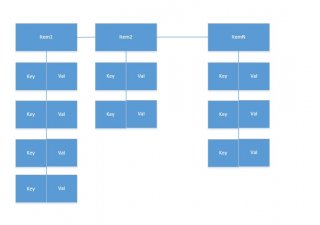
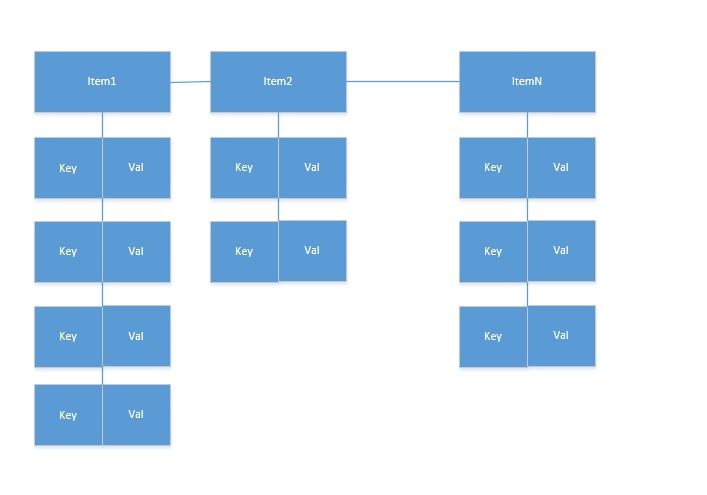
Hi all, I need your help to learn how can I implement the data structure as described in the attachment Thanks!